How to Check Challan by Driving Licence Number Online (2026)
Yes, you can check challan by driving licence number online through the official e-Challan portal, and it is a handy option when you do not have the vehicle number in front of you. You open the portal, choose the driving licence search option, enter your licence details, and the portal shows any pending challans linked to that licence. This guide walks you through the steps, the details you need, and what to do if a challan looks wrong or nothing shows up.
Why Check a Challan by Driving Licence Number
Most people check challans by vehicle number, because that is the most common search on the portal. But there are everyday situations where the licence route makes more sense. You may have driven a borrowed car or a company vehicle, and a challan may be linked to you as the driver rather than to a vehicle you own. You may also be checking your own record before renewing your licence or before a long trip, and you want to be sure nothing is pending against your name.
A DL based check is also useful when you have recently sold a vehicle. Challans issued while you were still the recorded driver can still appear, and catching them early saves you from a surprise later. Think of this route as a second lens on the same record: the vehicle number search shows challans on a vehicle, while the DL search shows challans connected to a driver.
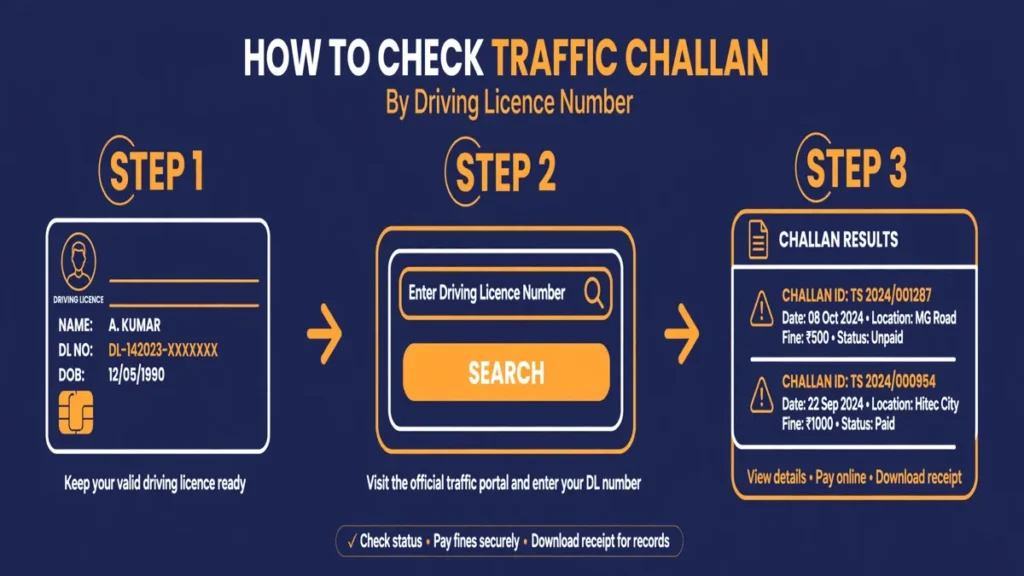
How to Check Challan by Driving Licence Number Step by Step
Follow these steps on the official portal:
- Open the e-Challan portal in your browser. This is the national portal for traffic challans, and it is the safest place to check.
- On the home page, look for the option to check challan status. You will see more than one search mode, including vehicle number, challan number, and driving licence number.
- Select the driving licence number option.
- Enter your driving licence number and date of birth exactly as they appear on your licence. In many cases the portal asks for both, because the date of birth helps confirm that the licence belongs to you.
- Complete the captcha shown on the screen and submit the form.
- The portal will display any pending challans linked to your licence. If there is more than one, they are usually listed with the oldest first.
Take a screenshot or note down the challan numbers before you move on to payment or dispute. It is much easier to follow up on a challan when you have its number handy.
If you would rather check by vehicle number instead, our guide on how to check and pay a traffic challan online explains that route in full, and the e-Challan status check guide covers the portal in more detail.
What Details You Need Before You Start
You do not need a long list of documents for this check. The table below covers what to keep ready.
| Detail you need | Where to find it | Why the portal asks for it |
|---|---|---|
| Driving licence number | Printed on your driving licence card | This is the main search key for a DL based lookup. |
| Date of birth | Printed on your driving licence card | Used to confirm your identity in many DL searches. |
| Captcha code | Shown on the portal screen | Proves the search is being made by a real person. |
| Challan number (optional) | On a challan notice or SMS, if you received one | Lets you jump straight to one specific challan. |
If your licence number has letters and digits, type them exactly as printed, without spaces. A single mistyped character can return no results, and that does not mean you are in the clear. It usually just means the search did not match. Double check the number, then try again.
What Your Challan Result Will Show
When a challan is found, the portal typically shows the details you need to decide your next step:
- The challan number, which you should quote in any payment or complaint
- The offence, for example overspeeding, signal jumping, or riding without a helmet
- The fine amount shown on the portal, which is the amount you need to pay
- The date and place of the offence, so you can recall whether you were there
- The issuing authority, such as the traffic police of the city or state concerned
- The current status, for example pending, paid, or forwarded to court
Read the offence and the date carefully before paying. If the place or date does not match your movements, do not rush to pay. The dispute section below explains what to do instead.
How to Pay a Challan Found by DL Number
Paying is straightforward once the challan is on your screen:
- Select the challan you want to pay from the results list.
- Confirm the offence details and the amount shown.
- Choose your payment method on the portal, such as UPI, net banking, or a debit or credit card.
- Complete the payment and wait for the confirmation screen.
- Save or download the receipt, and keep the payment receipt until the challan status changes to paid.
It is good practice to pay online through the portal itself rather than through an unknown third party website. The official portal updates the challan status directly, and your receipt comes from the same system that issued the challan. After a day or two, run the same DL search again to confirm the challan now shows as paid. Portal updates can take a little time, so a short delay is normal.
How to Dispute a Wrong Challan
A wrong challan is frustrating, but it can be challenged, and acting early helps. Dispute it quickly rather than leaving it unpaid for months, because an unpaid challan can eventually move to court.
- Note the challan number, offence, date, and place from the portal.
- Gather any proof you have, such as a toll receipt, a fuel bill, a parking receipt, or location history showing you were elsewhere.
- Use the grievance or complaint option on the portal, or contact the traffic police authority named on the challan, and submit your details with the proof.
- Keep a copy of your complaint reference number and follow up if you do not hear back.
Our detailed guide on disputing a wrong e-challan walks through the complaint process step by step, including what evidence helps most. Never pay a challan you genuinely believe is wrong just to get rid of it, because payment usually closes the matter and makes a later challenge much harder.
What to Do If You Cannot Check Challan by Driving Licence Number
Honesty matters here. The e-Challan portal’s main search options are vehicle number, challan number, and DL number, but not every challan is searchable by DL number in every case. Some challans, especially camera generated ones, are recorded against the vehicle first, and they may only appear under a vehicle number search. Portal screens can also vary slightly over time as the system is updated.
If the DL search returns nothing, or if the DL option is not offered for a particular challan, use the vehicle number search as your fallback. You will need the vehicle registration number and, in many cases, the last five digits of the chassis or engine number. That search is the most complete route, and it is the one to trust for a final answer before you conclude that nothing is pending.
You can also cross check through the wider Parivahan portal for vehicle related services, and the Sarathi portal for driving licence related services, such as checking your licence details or applying for licence services. These are official government portals, so treat any other website asking for your licence details with caution.
What to Do If No Challan Is Found
A result showing no challan found is good news, but read it correctly. It means no pending challan linked to that licence was found at the time of your search. It does not guarantee that a very recent offence has already been uploaded, because camera challans can take a few days to appear on the portal.
If you recently received an SMS about a challan but the portal shows nothing, wait a few days and check again, and also try the vehicle number search. If you are checking before a licence renewal or a vehicle sale, repeat the check closer to the date, so you are working with the freshest record.
Common Mistakes to Avoid
A few small mistakes cause most failed searches:
- Typing the licence number with spaces or a wrong letter, then assuming the clean result is final
- Entering a date of birth in the wrong format, when the portal expects the format shown on screen
- Checking only once after a recent trip, before a camera challan has been uploaded
- Paying through an unofficial website that charges extra or never updates the official record
- Ignoring an old unpaid challan, which can turn into a court matter over time
The safest habit is simple: check once a month if you drive regularly, and check again before licence renewals, vehicle sales, and long trips. Two minutes of checking beats months of follow up later.
One last warning is worth repeating plainly: do not ignore an unpaid challan. Even a small fine can grow into a bigger problem once it is forwarded to court, and court-forwarded challans usually need a court visit or a Lok Adalat settlement to close. Paying or disputing promptly keeps the matter in your control.
Frequently Asked Questions
Can I check a challan using only my driving licence number?
Yes, the e-Challan portal offers a driving licence number search option. In many cases you will also need your date of birth, so keep your licence card handy before you start.
What if the DL search shows no challan but I received an SMS about one?
Wait a few days and check again, then try the vehicle number search as well. A recent challan may not have been uploaded yet, and some challans are recorded against the vehicle rather than the licence.
Is the DL number search free?
Yes, checking challan status on the official e-Challan portal is free. You only pay the fine amount shown on the portal if a challan is pending, and there is no separate fee for the search itself.
Can I pay a challan found through a DL search online?
Yes, once the challan appears in your search results, you can select it and pay through the portal using UPI, net banking, or a card. Save the receipt and recheck the status after a day or two to confirm it shows as paid.
What should I do if a challan linked to my licence is actually wrong?
Do not pay it in a hurry. Note the challan number and offence details, gather proof such as receipts or location records, and raise a dispute through the portal or with the issuing traffic authority. Our guide on disputing a wrong e-challan explains the process in detail.
Does a DL based challan check work for all states in India?
The national e-Challan portal covers most states, but a few states also run their own traffic fine portals. If your DL search shows nothing and you drive regularly in one state, it is worth checking that state’s traffic police portal too, along with the vehicle number search on the national portal.
Open the e-Challan portal
Open the e-Challan portal and choose the option to check challan status.
Select the driving licence search
Select driving licence number as the search mode.
Enter your licence details
Enter your driving licence number and date of birth exactly as they appear on your licence.
Complete the captcha and submit
Complete the captcha shown on the screen and submit the form to view pending challans.
Review the challan details
Check the challan number, offence, fine amount, date and place before paying or disputing.
Pay or dispute the challan
Pay through the portal and save the receipt, or raise a dispute with proof if the challan is wrong.