Chandigarh Vehicle Status Check Online: RC and Challan (2026)
A chandigarh vehicle status check takes only a few minutes when you know where to look. You can verify RC details on the Vahan portal, find pending e-challans on the e-Challan portal, and confirm insurance, PUC and fitness validity using just the vehicle registration number. Chandigarh vehicles are covered by the national Parivahan system, so almost every check is available online, which suits a compact city where many vehicles cross into Punjab and Haryana daily.
Chandigarh Vehicle Status Check: RC Details on the Vahan Portal
The most reliable way to run a chandigarh vehicle status check for registration details is the central Vahan portal (https://vahan.parivahan.gov.in). The record you see there is the same record the registering RTO office sees, so it is the check to start with whether you are buying a used car in Sector 17 or selling a bike in Mohali’s neighbouring market.
Follow these steps: 1. Open the Vahan portal and go to the “Know Your Vehicle Details” option under vehicle related services. 2. Enter the full registration number, for example CH 01 AB 1234. You can enter it with or without spaces. 3. Solve the captcha and submit the search. 4. The portal shows the registration date, owner serial number, maker and model, fuel type, RC validity, insurance validity, PUC validity, fitness validity for commercial vehicles, and any hypothecation (loan) entry.
Compare every field with the physical documents. A hypothecation entry the seller never mentioned, or expired insurance, is exactly what this check is meant to catch. Our VAHAN status check guide (https://vahandetail.com/vahan-status-check-online/) explains each field on the result screen in more detail, and our RC status check guide (https://vahandetail.com/rc-status-check-online/) covers application tracking for services already in progress.
Checking Pending e-Challans for Chandigarh Vehicles
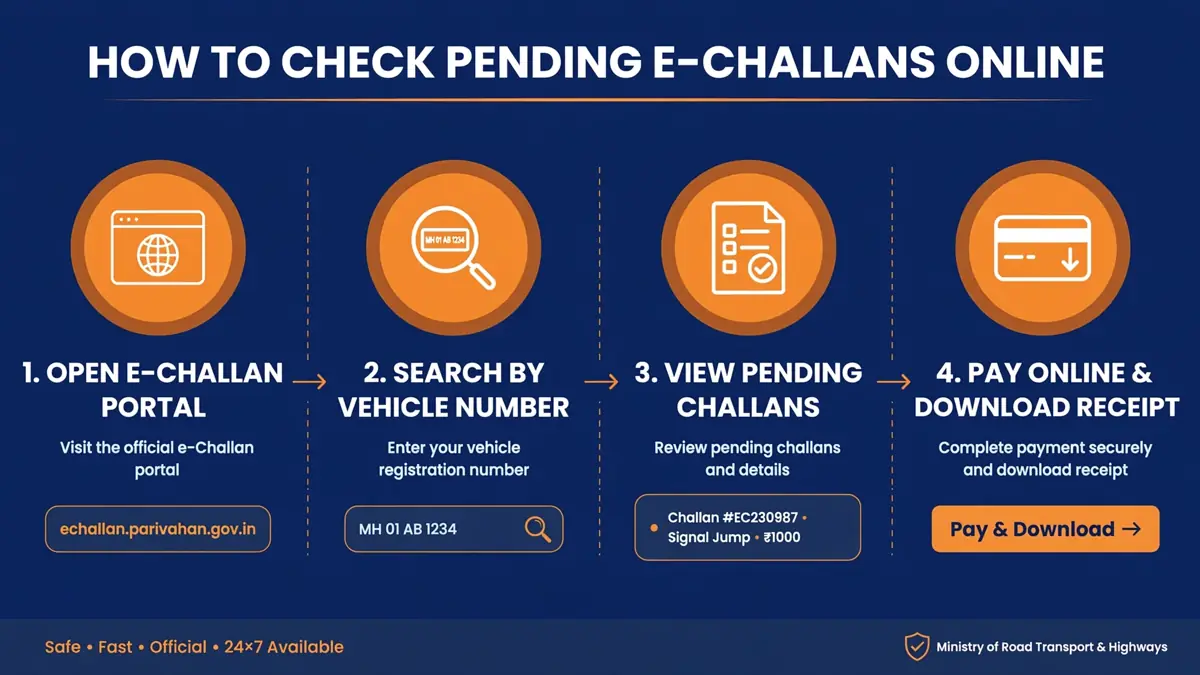
Chandigarh Traffic Police issues challans on the national e-Challan system, and unpaid challans can surface later when you renew a fitness certificate or transfer ownership. Chandigarh is known for strict camera-based enforcement, so city buyers should never skip this check. To check on the e-Challan portal (https://echallan.parivahan.gov.in): 1. Go to the e-Challan portal and choose “Check Challan Status”. 2. Search by vehicle number. You can also search by challan number or driving licence number. 3. Enter the captcha and submit. 4. The portal lists every pending challan with the violation, the amount, the date and place of the offence, and the issuing authority.
If challans show up, pay them right there using UPI, net banking, or a card, and download the receipt immediately. A challan can take 24 to 48 hours to clear after payment, which is a sync delay, not a second fine.
Always run this check separately from the RC check before buying a used vehicle. A clean RC with pending challans means the seller’s unpaid fines can become your headache during transfer. For the full payment flow, see our guide to check and pay traffic challans online via Parivahan (https://vahandetail.com/check-pay-traffic-challan-online-via-parivahan/).
Road Tax and Other Chandigarh Vehicle Status Checks
Private vehicles in Chandigarh pay road tax once, at registration, and it is included in the on-road price at the dealership. Commercial vehicles pay periodically, usually yearly or quarterly depending on the vehicle class.
To verify or pay online, open the Vahan portal, select “Vehicle Related Services”, then Chandigarh and your RTO. Choose the tax payment option, enter the registration number, and the portal shows the applicable tax mode and any amount due. Pay with UPI, net banking, or a card, and download the receipt. If you lose it later, the reprint option retrieves it using the registration number or application number.
The same Vahan services menu also covers ownership transfer, change of address, duplicate RC, hypothecation addition or removal, and fitness certificate services. The Parivahan Sewa portal (https://parivahan.gov.in) offers these services when you select Chandigarh as your state or union territory. For PUC validity specifically, see our PUC certificate check guide (https://vahandetail.com/puc-certificate-check-online/).
Chandigarh Transport Department Online Services
Chandigarh’s transport services run through the national Parivahan system, backed by the same Vahan and Sarathi databases used by RTO offices across India. That matters in the Tricity area, because a vehicle bought in Chandigarh, serviced in Panchkula and driven daily in Mohali still has one central record.
Services available online include fresh registration and RC download, ownership transfer, change of address, duplicate RC, hypothecation addition or removal, fitness certificate issuance and renewal, road tax payment, commercial vehicle permits, and fancy number allocation. Driving licence services, including renewal and duplicate licence, run on the Sarathi portal (https://sarathi.parivahan.gov.in), which is the licence side of the same Parivahan system.
Keep your application number safe, because it is how you track every service afterwards.
CH RTO Codes: Which Office Registered Your Vehicle
Chandigarh vehicles carry codes starting with CH, and CH-01 is the main Chandigarh code seen on most private vehicles in the city. Additional CH series are also used for specific vehicle categories in the union territory, so an unfamiliar CH series is not automatically fake.
When in doubt, verify the code on the Vahan portal, which shows the registering authority for the vehicle. This matters for Tricity buyers in particular: a CH plate, a PB plate and an HR plate can all belong to vehicles parked on the same street, so never judge the registering office from the owner’s address alone.
High-Security Number Plates for Chandigarh Vehicles
The HSRP mandate applies in Chandigarh like the rest of India. Vehicles sold from April 2019 onward come with HSRP fitted at the dealership, while older vehicles were given deadlines to get HSRP retrofitted from authorised vendors. A genuine plate has a chromium based hologram, a 10-digit laser etched PIN, an IND marking, and non-removable snap locks. Plates from roadside shops without these features are not HSRP.
Common Problems and How to Fix Them
Mobile number not linked to the record. Several Vahan services send an OTP to the registered mobile number. If you changed yours, update it first through the Vahan portal’s mobile update option or at your RTO, because everything else waits on that OTP.
Very old vehicles show incomplete records. Some older entries were digitised imperfectly when records moved online. If your old vehicle’s record looks blank or wrong, visit the registering RTO with the original RC so the entry can be corrected.
Name mismatch after a transfer. An ownership transfer never completed on paper is the most common cause. Both buyer and seller have roles in the Vahan transfer flow, so check the transfer status and complete it if your old vehicle still shows your name.
Challan paid but still showing as pending. Wait 24 to 48 hours and keep your payment receipt. If it still shows after that, use the e-Challan portal’s transaction verification option with your challan number and bank reference.
Cross-border confusion in the Tricity. If a seller says the vehicle is “Chandigarh registered” but the plate shows another state’s code, trust the Vahan record, not the claim. The registering authority field settles it in seconds.
Frequently Asked Questions
How can I check Chandigarh vehicle status by registration number?
Enter the registration number on the Vahan portal’s Know Your Vehicle Details page. It shows RC validity, maker and model, insurance and PUC validity, and hypothecation status for any Chandigarh registered vehicle.
How do I check pending challans on a Chandigarh number plate?
Use the e-Challan portal’s Check Challan Status with the vehicle number. It lists all pending challans with violation details and amounts, and you can pay them online.
Can I pay Chandigarh road tax online?
Yes. Commercial vehicle tax can be paid on the Vahan portal under the tax payment option after selecting Chandigarh and your RTO, with an immediately downloadable receipt.
Which RTO code is Chandigarh?
Most Chandigarh private vehicles carry CH-01. Verify any other CH series on the Vahan portal, which shows the registering authority.
What should I check before buying a used vehicle in Chandigarh?
Run three checks: RC details on the Vahan portal, pending challans on the e-Challan portal, and the RTO code on the Vahan record. Also confirm the hypothecation entry is clear and insurance and PUC are valid. Resolve any flag with the seller before paying.
Does a Chandigarh vehicle need a separate check if it is driven in Punjab or Haryana?
No. The RC and challan records are national Parivahan records, so the same Vahan and e-Challan checks cover the vehicle wherever it is driven in India.
Check RC details and pending challans for a Chandigarh vehicle in a few minutes.
Open the Vahan portal
Go to Know Your Vehicle Details under vehicle related services on the Vahan portal.
Enter the registration number
Enter the full registration number, for example CH 01 AB 1234, with or without spaces.
Solve the captcha and submit
Complete the captcha and submit the search to view the vehicle record.
Review the RC details
Check registration date, maker and model, RC, insurance, PUC and fitness validity, and any hypothecation entry.
Check pending challans separately
Search the same number on the e-Challan portal and pay any pending challans before buying.