VAHAN Status Check: Track Application & Registration Status
Applied for a new registration, a duplicate RC, an ownership transfer, or any other vehicle-related service and wondering where it stands? The “Know Your Application Status” service on parivahan.gov.in (Online Services → Vehicle Related Services → select your state) lets you track it online. Enter your application number — or your chassis and engine numbers — and the portal shows the current stage, from submission to approval and RC dispatch.
This is the status intent: not “what are my vehicle’s details” (that’s a record lookup) but “where is my application right now.” Here’s how to run the check and how to read the result.
Application Status vs RC Status: Don’t Mix Them Up
People search both phrases, but they answer different questions:
| Check | Question it answers | What you need |
|---|---|---|
| Application status (this guide) | Where is my pending application? | Application number (or chassis + engine no.) |
| RC status check | Is my RC valid/active right now? | Vehicle registration number |
If you just submitted paperwork at the RTO or applied online and want to follow its progress, you want the application status. If you want to verify an existing RC’s validity, use the RC status check instead.
What You Can Track
“Know Your Application Status” covers applications filed through VAHAN’s Vehicle Related Services, including:
- New vehicle registration
- Duplicate RC issuance
- Ownership transfer
- Hypothecation addition / termination
- Change of address in RC
- RC renewal and other RC services
Each application gets a unique application number at the time of submission (online applicants see it on the confirmation screen; offline applicants find it on the RTO receipt). Keep it safe — it’s your tracking ID.
Step-by-Step: How to Check Your VAHAN Application Status
- Go to parivahan.gov.in and click “Online Services” in the main menu.
- Select “Vehicle Related Services” from the dropdown.
- Select your state from the list, then choose your RTO — the portal routes you to the state-specific VAHAN services page.
- Look for “Know Your Application Status” in the services menu and click it.
- Enter your application number in the search field. (If you don’t have it, use the alternative method below.)
- Complete the verification (captcha) and submit.
- The portal displays your application’s current status, the service type, and the stages it has passed.
The whole check takes under two minutes and needs no login.
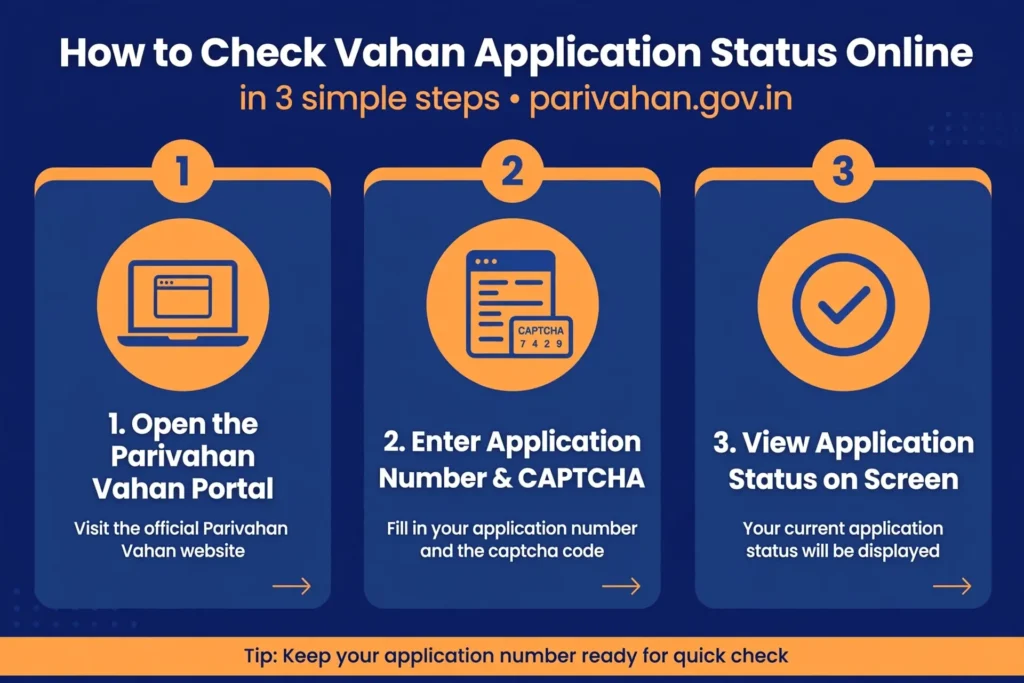
How to Check Your VAHAN Application Status Online
Open Online Services on Parivahan
Go to parivahan.gov.in and click Online Services in the main menu.
Select Vehicle Related Services
Choose Vehicle Related Services from the dropdown.
Select your state and RTO
Select your state from the list, then choose your RTO to reach the state-specific VAHAN services page.
Open Know Your Application Status
Find Know Your Application Status in the services menu and click it.
Enter your application number
Enter your application number in the search field. If you do not have it, use the chassis and engine number option.
Complete verification and submit
Complete the captcha verification and submit the form.
View your application status
The portal displays your application’s current status, the service type, and the stages it has passed. The check takes under two minutes and needs no login.
No Application Number? Use Chassis + Engine Number
Lost your receipt or never noted the number? The status screen usually offers an alternate search:
- On the “Know Your Application Status” page, choose the chassis/engine number option if available.
- Enter the chassis number (all 17 characters) and engine number exactly as printed on your RC or invoice.
- Submit — the portal lists applications linked to that vehicle.
Type these carefully: chassis numbers mix similar-looking characters (0/O, 1/I), and one wrong character returns nothing.
What Each Application Status Means
Statuses vary slightly by state, but the core stages are consistent:
| Status | Meaning | What to do |
|---|---|---|
| Application Submitted / Initiated | Your application is in the system, awaiting RTO scrutiny | Wait; check again in a few working days |
| Under Processing / Pending Verification | An RTO officer is verifying documents | Wait; keep your documents handy in case of a query |
| Pending Payment | The fee wasn’t completed | Complete the payment online to move forward |
| Query Raised / Objection | The RTO needs a correction or an additional document | Read the remark, fix it, and resubmit promptly |
| Approved | The application is accepted; the RC/card is being prepared | Wait for printing and dispatch |
| RC Dispatched / Printed | The RC smart card has been printed and handed to post | Track delivery; allow postal time to your address |
| Rejected | The application was refused (reason shown) | Read the reason; reapply with corrections if eligible |
Typical timelines (indicative, varies by state and RTO workload): online applications often move from submission to approval in 7–15 working days, with RC dispatch adding postal time. Offline applications can take longer. If your status hasn’t moved for several weeks with no query raised, visit the RTO with your application number.
If Your Status Shows a Query or Objection
Don’t panic — a query is the RTO asking for something, not a rejection:
- Read the exact remark on the status screen (e.g. “address proof unclear”, “NOC required”).
- Gather the corrected document — rescan clearly if legibility was the issue.
- Respond through the same portal (there’s usually an option to upload against the query) or at the RTO counter, quoting your application number.
- Recheck the status after a few working days to confirm it moved back to processing.
Queries stall only if ignored — most are resolved within days once you respond.
Application Status Not Found? Troubleshoot This Way
- Wrong state/RTO selected: the application lives under the state and RTO where it was filed. Reselect carefully.
- Typo in the application number: application numbers are long — copy it from the receipt rather than typing from memory.
- Pending Payment: the fee wasn’t completed — complete the payment online to move forward.
- Filed fully offline long ago: very old manual applications may not be digitized; check at the RTO counter.
- Portal maintenance: VAHAN goes down for scheduled maintenance, often late at night — retry during the day.
How do I check my VAHAN application status online?
Go to parivahan.gov.in → Online Services → Vehicle Related Services → select your state and RTO → Know Your Application Status → enter your application number → submit. The current stage of your application appears on screen.
What is my VAHAN application number?
It’s the unique tracking ID generated when your application was submitted — shown on the online confirmation screen or printed on the RTO receipt for offline applications. Without it, you can usually search by chassis and engine number instead.
What does “RC Dispatched” mean in VAHAN status?
It means your application was approved, the RC smart card has been printed, and it has been handed over for postal delivery to your registered address. Allow normal postal delivery time before following up.
How long does a VAHAN application take to approve?
Indicative timelines are 7–15 working days from submission to approval for online applications, plus dispatch/postal time — but this varies widely by state and RTO workload. Track your own application rather than relying on averages.
My application shows “Query Raised”. Is it rejected?
No. A query means the RTO needs a correction or an additional document. Read the remark, submit what’s asked, and the application returns to processing. Only an explicit “Rejected” status is a refusal.
Can I check application status without the application number?
In most states, yes — the status page offers a chassis number + engine number search as an alternative. Enter both exactly as printed on your RC or sale invoice.
Bottom line: your application number is the key — enter it under “Know Your Application Status” in your state’s Vehicle Related Services, and VAHAN shows you exactly where things stand.