Change of Address in RC Online: Form 33 Process, Documents and Fees (2026)
You moved house, but your RC still shows your old address. The Motor Vehicles Act expects you to report the change within 30 days of moving. Filing a change address in RC online is straightforward: the prescribed application is Form 33, and you submit it through the Parivahan Sewa portal. Here is the process, the documents, the fees, and what to do if you moved across state borders.
What Is Form 33?
Form 33 is the official application for recording a change of the registered owner’s address in a vehicle’s Registration Certificate. It is prescribed under Rule 59 of the Central Motor Vehicles Rules, 1989 (Section 49 of the Motor Vehicles Act, 1988).
Before you start, make sure this is the right form. If you bought the vehicle from someone else, that is an ownership transfer: see our guide on vehicle ownership transfer online in India. If your RC is lost or damaged, that is a duplicate RC case: see how to download your RC book online in India.
Step-by-Step: File Change Address in RC Online
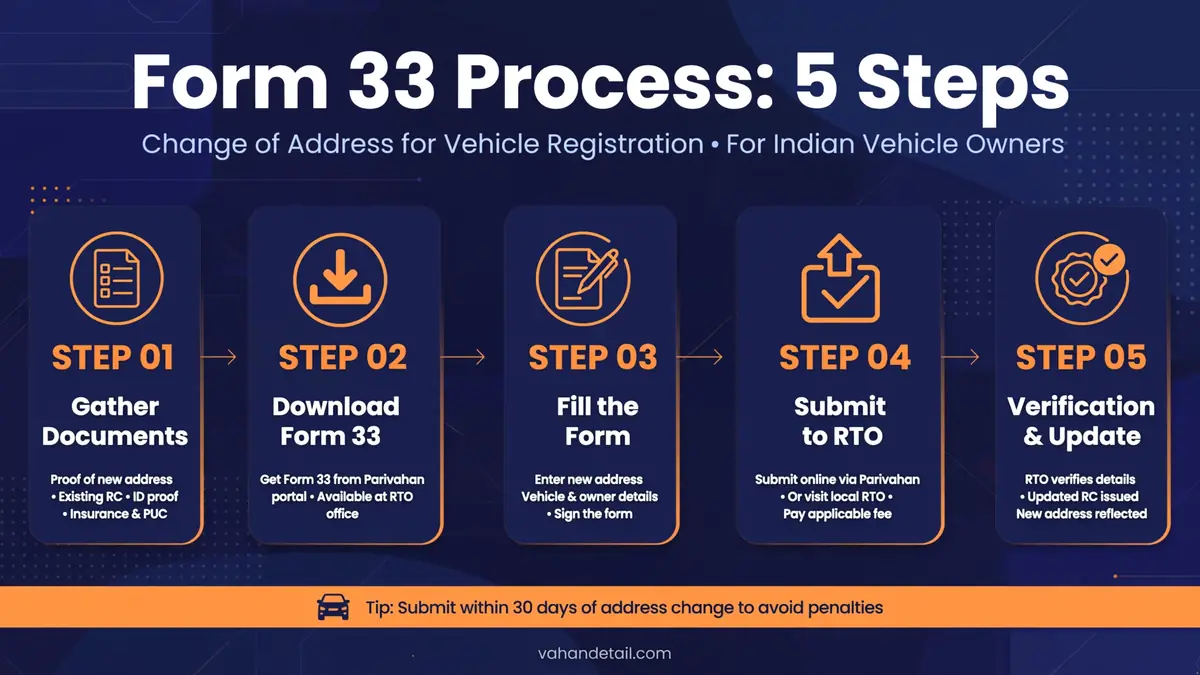
The service runs on the Vahan portal under “Vehicle Related Services”. Screens vary slightly by state and RTO, but the flow is consistent. Keep your registration number, the last five chassis digits, and your registered mobile phone nearby.
- Open Vehicle Related Services. Go to https://vahan.parivahan.gov.in, click Online Services, then choose Vehicle Related Services.
- Select state and RTO. Choose the state where the vehicle is registered, pick the RTO, and click Proceed.
- Enter the registration number. Type the number, click Proceed, then select Basic Services.
- Verify with the chassis number. Enter the last five digits of your chassis number and click Validate Regn_no/Chassis_no.
- Authenticate with OTP. Click Generate OTP, enter the code sent to the mobile number linked to your vehicle record, and click Submit.
- Select “Change of Address”. Fill in your new address exactly as it appears on your address proof, PIN code included.
- Confirm insurance details. The form asks you to confirm or update your insurance policy details.
- Check the fee panel. The portal shows the fee for your state and vehicle type before you pay. Pay online via UPI, net banking or card.
- Upload documents. Attach scanned copies of your address proof, RC, insurance and PUC certificates, plus the signed Form 33 if your state asks for it.
- Book an appointment and save the receipt. Some RTOs require a slot for physical verification. Download the application and fee receipt, and note your application number.
- Visit the RTO if required. Take the originals of all documents on your appointment date.
- Track the application. Use your application number on the Vahan portal. See our explainer on RC status check online.
Once approved, the RTO issues an updated RC with the new address, usually as a smart card delivered by post or collected from the RTO.
Documents Required for an RC Address Change
Gather these before you start. Requirements vary by state, so confirm the portal’s checklist for your RTO:
- Original RC, the existing registration certificate
- Proof of new address: Aadhaar card, passport, voter ID, utility bill, or registered rent agreement
- Valid motor insurance certificate, current on the date of application
- Valid PUC certificate, where applicable
- Financier NOC, only if the vehicle is under hire-purchase, lease or hypothecation (the lender holds a recorded interest, and RTOs will not update the RC without the lender’s consent)
- PAN card / Form 60 / Form 61, where applicable
- Chassis and engine pencil print, and proof of up-to-date road tax, asked by some RTOs
Fees for Change of Address in RC
Fees follow Rule 81 of the Central Motor Vehicles Rules, 1989, but the actual amount is set at the state level. Reported ranges commonly fall between roughly Rs 150 and Rs 2,500 depending on the vehicle type, plus a smart card reissue charge. The Vahan portal shows the exact fee on its fee panel before you pay, so confirm it there.
Intra-State Move vs Inter-State Move
Moved within the same state? File Form 33 as described above. The change is recorded against your existing registration, and your registration number does not change.
Moved to a different state? A vehicle kept in another state for more than 12 months must be re-registered there:
- Apply for an NOC (No Objection Certificate) from the RTO where the vehicle is registered, on the Vahan portal. Clear any pending challans first, and get your financier’s consent if the vehicle is under loan. The NOC is generally valid for six months, so do not delay the next step.
- Apply for re-registration at the RTO covering your new address. Submit the NOC with your RC, insurance, PUC and new address proof, and pay the road tax due in the new state.
- The vehicle is inspected if the RTO requires it, and you receive a new registration number, which means fitting new number plates.
You can usually claim a refund of the unused road tax from your original state, so keep all payment records safe.
How to Track Your Updated RC Smart Card
After approval, the updated RC smart card is printed and dispatched. Track it with your application number on the Vahan portal. If the status shows dispatched, the card is normally delivered to your new address by post within a couple of weeks. Keep the fee receipt until the card is in your hand.
What Happens If You Do Not Update Your Address
Skipping it has real consequences:
- Challan notices go to the wrong address. Traffic challans and court notices keep arriving at the old address, and “I never received it” is not a defence.
- Transfers and renewals get stuck. When you sell the vehicle or renew the RC, the address mismatch flags during verification and delays everything.
- Insurance claims get complicated. Insurers cross-check registration details, and stale information gives them room to argue.
- Penalties. Non-reporting is an offence under the Act and can attract fines or legal action.
Updating the address is a small, one-time task.
Note: RTO requirements, fees and portal screens change over time and differ between states. The document list and fee range above are indicative; always treat the checklist shown on the Vahan portal during your own application as the final word.
What is Form 33 used for?
Form 33 is the prescribed application for recording a change of the registered owner’s address in the RC, under Rule 59 of the Central Motor Vehicles Rules, 1989. You use it when you move house but remain the owner of the vehicle.
Can I change my RC address online?
Yes. The Vahan portal offers a Change of Address service under Vehicle Related Services. You verify the vehicle with the chassis number and an OTP, fill in the new address, upload documents, pay the fee, and book an RTO appointment if your state requires one.
How long do I have to report an address change?
Report it to the registering authority within 30 days of moving. A delay can attract penalties under the Motor Vehicles Act.
Do I need an NOC to change the address on my RC?
For an intra-state change, no. An NOC is needed when you move to a different state and must re-register the vehicle there, and separately from your financier if the vehicle is under a loan or hypothecation.
Does changing my RC address also update my driving licence address?
No. The driving licence is a separate document, updated through the Sarathi services. If you have moved, update both.
How much does it cost to change the address on an RC?
Fees vary by state and vehicle type under Rule 81. Reported figures commonly range from about Rs 150 to Rs 2,500 plus a smart card reissue charge. The exact amount appears on the Vahan portal’s fee panel during your application.
Change the address on your RC online with Form 33: apply through the Vahan portal, verify with OTP, upload documents, pay the fee, and track your updated RC.
Open Vehicle Related Services
Go to vahan.parivahan.gov.in, click Online Services, then choose Vehicle Related Services.
Select state and RTO
Choose the state where the vehicle is registered, pick the RTO, and click Proceed.
Enter the registration number
Type the number, click Proceed, then select Basic Services.
Verify with the chassis number
Enter the last five digits of your chassis number and click Validate Regn_no/Chassis_no.
Authenticate with OTP
Click Generate OTP, enter the code sent to the mobile number linked to your vehicle record, and click Submit.
Select “Change of Address”
Fill in your new address exactly as it appears on your address proof, PIN code included.
Confirm insurance details
The form asks you to confirm or update your insurance policy details.
Check the fee panel
The portal shows the fee for your state and vehicle type before you pay. Pay online via UPI, net banking, or card.
Upload documents
Attach scanned copies of your address proof, RC, insurance and PUC certificates, plus the signed Form 33.
Book an appointment and save the receipt
Some RTOs require a slot for physical verification. Download the application and fee receipt.
Visit the RTO if required
Take the originals of all documents on your appointment date.
Track the application
Use your application number on the Vahan portal until the updated RC is issued.