Vehicle Owner Details – RTO Vehicle Information 2026
Finding vehicle owner details in India has never been simpler, whether you’re purchasing a secondhand car, confirming a car before a sale, or just checking your personal registration status. Any citizen can check RTO car information in minutes using a number of official, government-backed platforms provided by the Ministry of Road Transport and Highways (MoRTH), including the VAHAN National Register, the mParivahan app, and even a basic SMS service.
In addition to explaining how to read a car registration number, apply for a fancy number, and respond to frequently asked questions regarding RC details, this book covers every technique available in 2026.
Quick Overview: Official Vehicle Information Portals
| Feature | Description |
|---|---|
| Online Portal | Government website for transport services |
| Coverage | National — available across all Indian states |
| Key Services | Driving License (DL), vehicle registration, eChallan |
| Who Can Use It | All Indian citizens |
| Official Websites | parivahan.gov.in and sarathi.parivahan.gov.in |
Check Also: Vehicle Details by Number Plate – Check Vahan Details Online
How to Check Vehicle Owner and RC Details in India:
In India, there are three recognized methods for locating a car’s owner and registration (RC) details.
Method 1: VAHAN National Register e-Services Portal
You can register, view registration information, monitor the status of your application, and access all vehicle-related services online with the VAHAN portal.
Steps to check vehicle details on VAHAN:
- Visit vahan.parivahan.gov.in/nrservices/
- Click “Know Your Vehicle Details” from the menu.
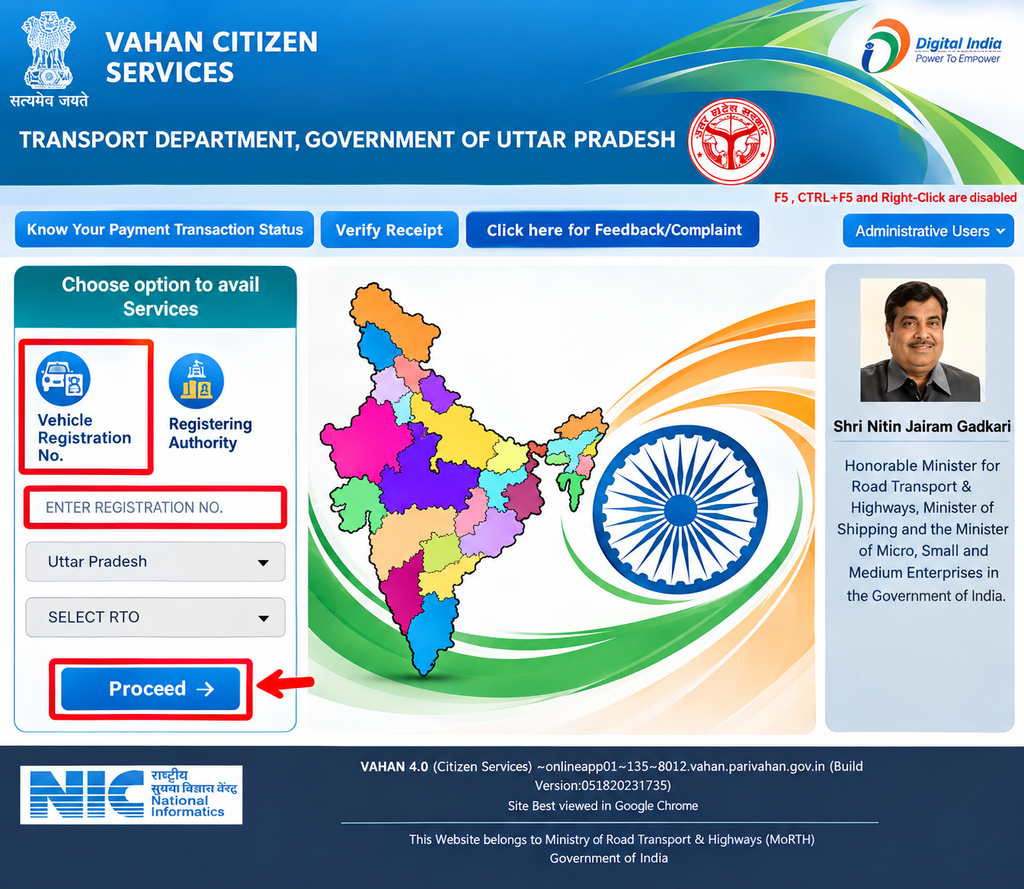
- Enter your mobile number and the verification code shown, then click Next.
- If you’re a new user, select Create Account to register.
Note: Before enrolling, make sure your mobile number is active because you will receive an OTP on it.
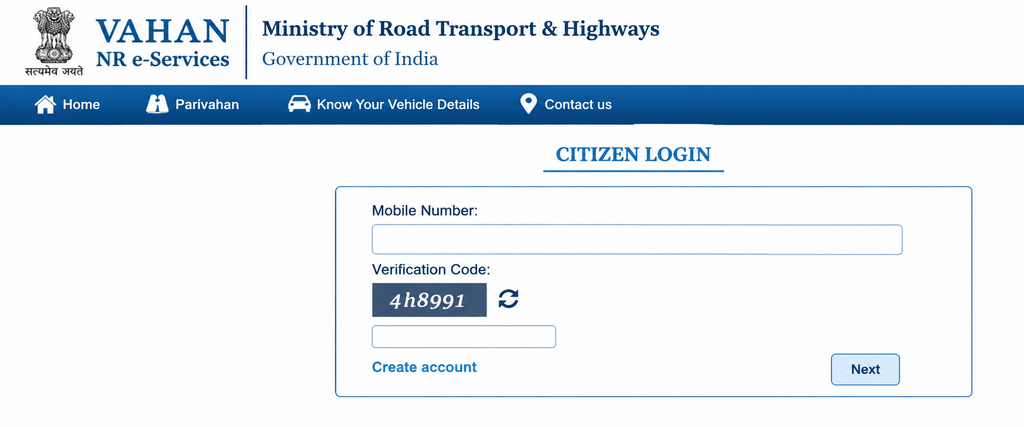
Registration process:
- On the registration page, enter your mobile number and email address, add the verification code, and click Generate OTP.
- Click Save after entering your name and creating a password.
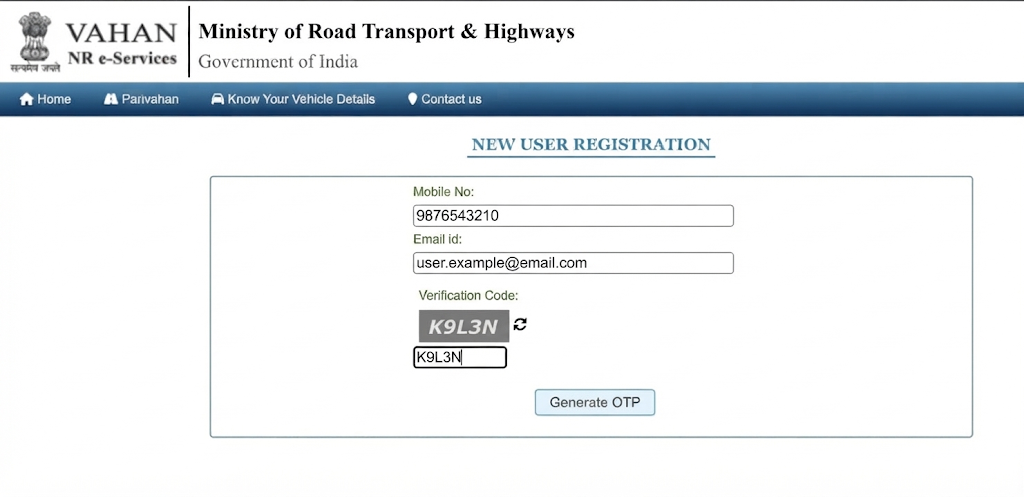
- After registering, use your OTP and cell number to log in.
- After logging in, the RC Status page opens. Enter your vehicle number and the verification code to check registration status.
Note: Before submitting, double-check your car number because even a minor error could make it difficult for the system to find the right RC record.
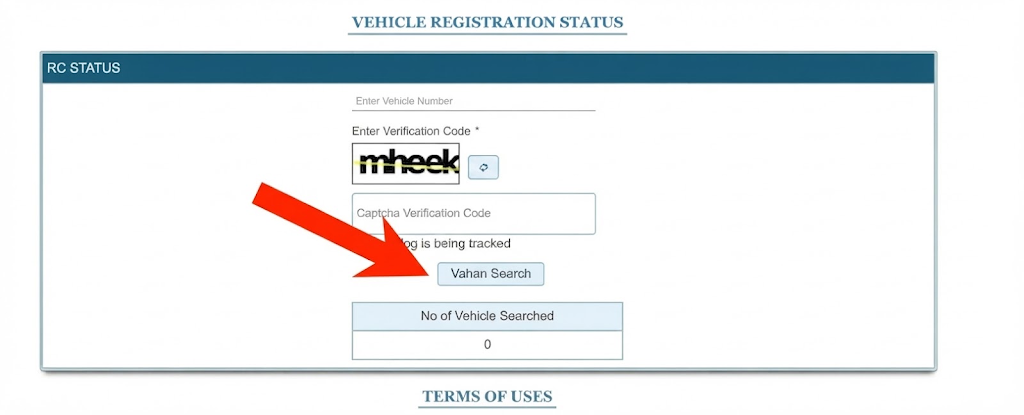
- Click “Vahan Search” to view full ownership and registration information, including RTO office name, registered owner’s name, registration date, insurance validity, and fitness status.
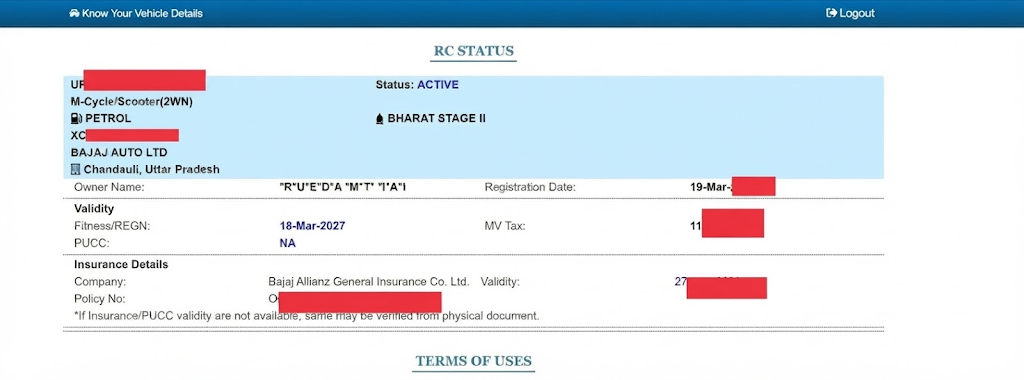
- Take a screenshot for your own documentation, and refrain from disclosing private car details to third parties.
Method 2: SMS Service
For a rapid, no-app, no-login solution:
- Open your message app and type: VAHAN <Vehicle Number>
- Send it to 07738299899.
- The owner’s name and pertinent vehicle information will be sent to you via SMS.
Method 3: mParivahan App
The official mobile platform for verifying license and vehicle details is the NextGen mParivahan app.
Steps:
- Download NextGen mParivahan from the Google Play Store or Apple App Store.
- To view your dashboard, log in.
- Open Informational Services.
- Tap RC Search to check registration details.
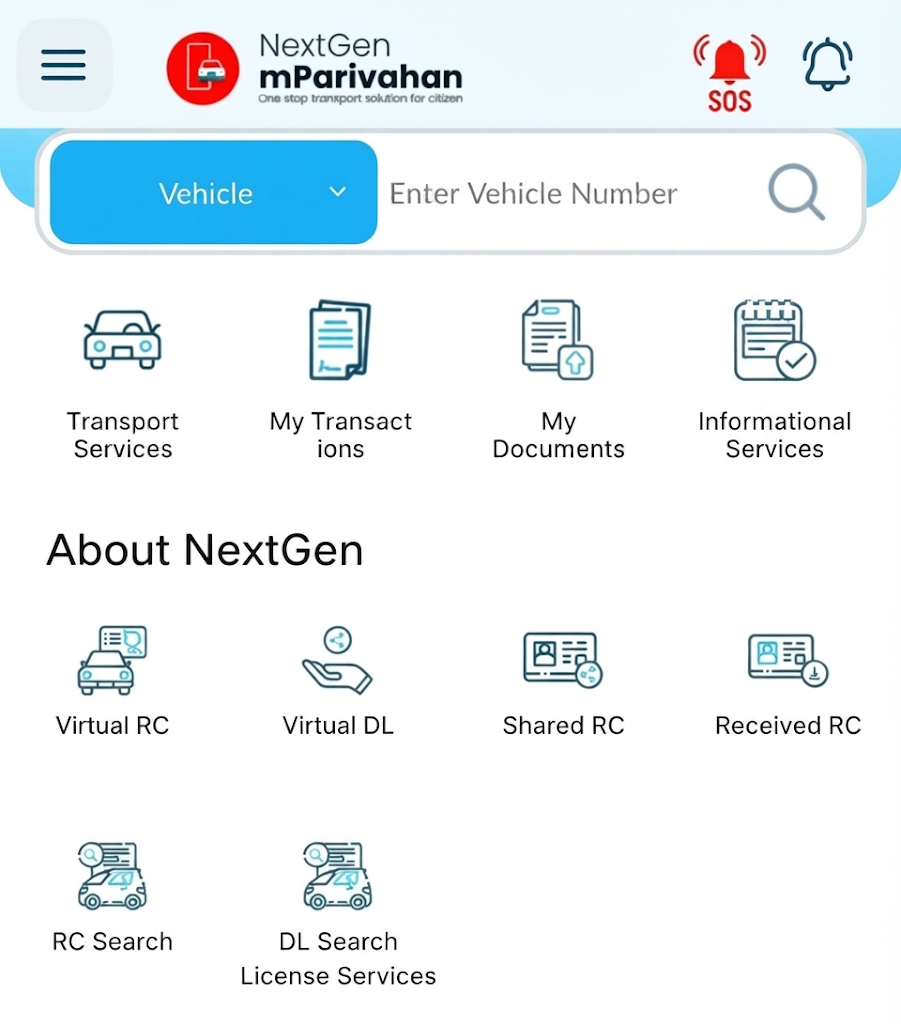
- Tap Search after entering the car’s registration number, which can be found on the license plate.
- The screen will display the owner’s name, model, engine number, chassis number, and more registration information.
An additional helpful feature is that mParivahan allows you to view your digital RC and driver’s license, which you may keep in DigiLocker for convenient access at any time.
How to Get RTO Vehicle Information via Parivahan Sewa Portal:
The Parivahan Sewa portal’s Know Your Vehicle Details service lets you check any RTO-registered vehicle’s information.
Steps:
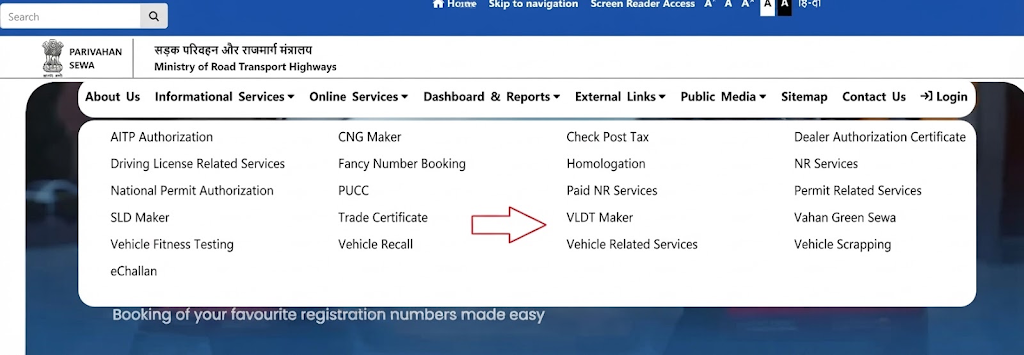
- Visit parivahan.gov.in
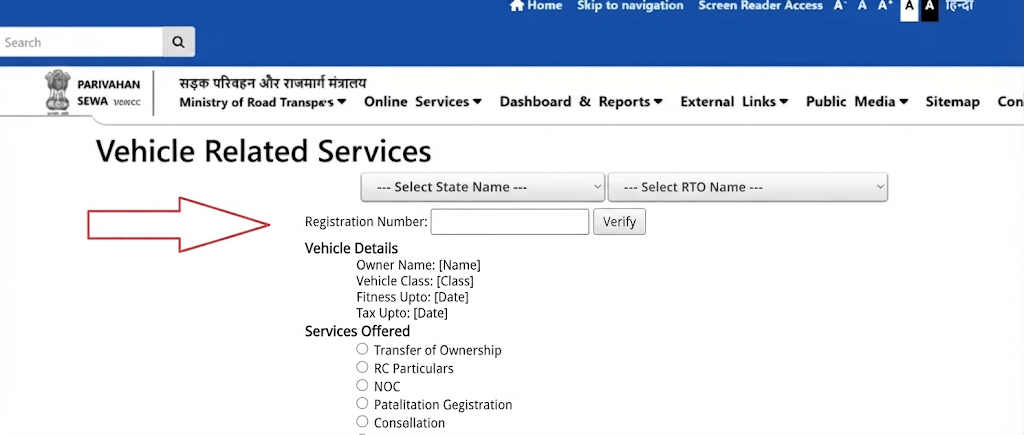
- Click “Vehicle Related Services” and continue to the vehicle details search.
- Select your state and RTO, then click Proceed.
- From the menu, go to Services → Additional Services.
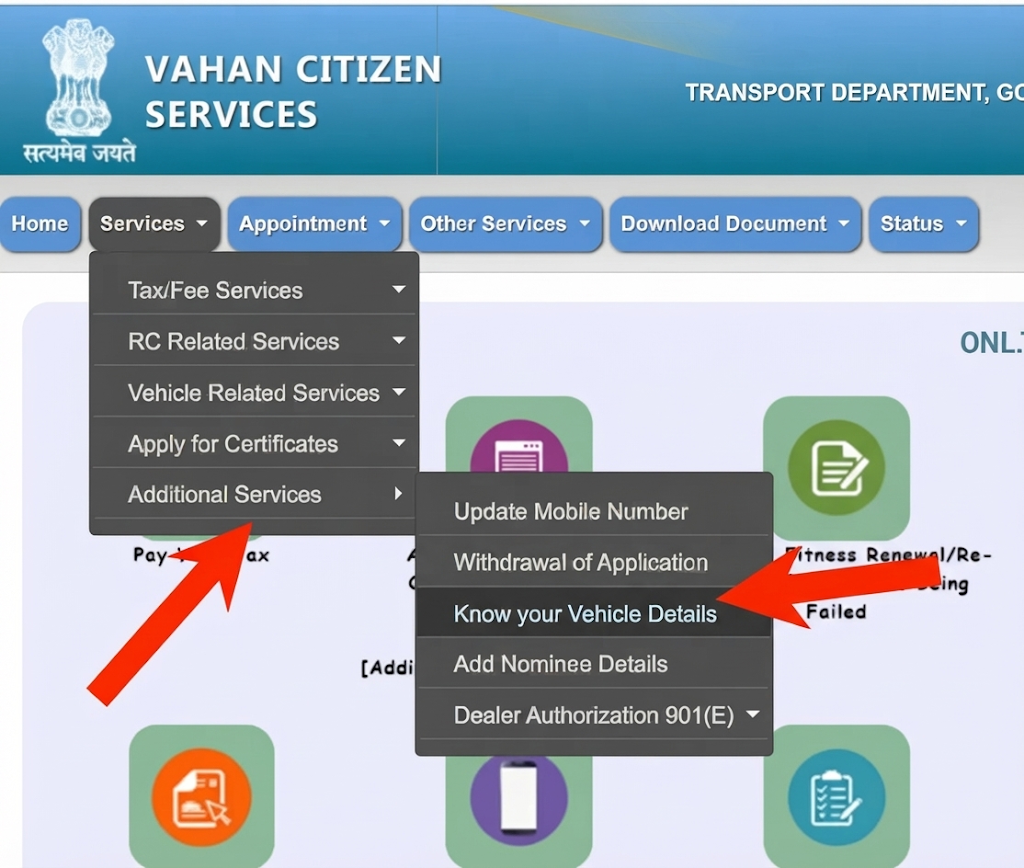
- Click “Know Your Vehicle Details.”
- Enter the engine, chassis, and registration numbers for your car.
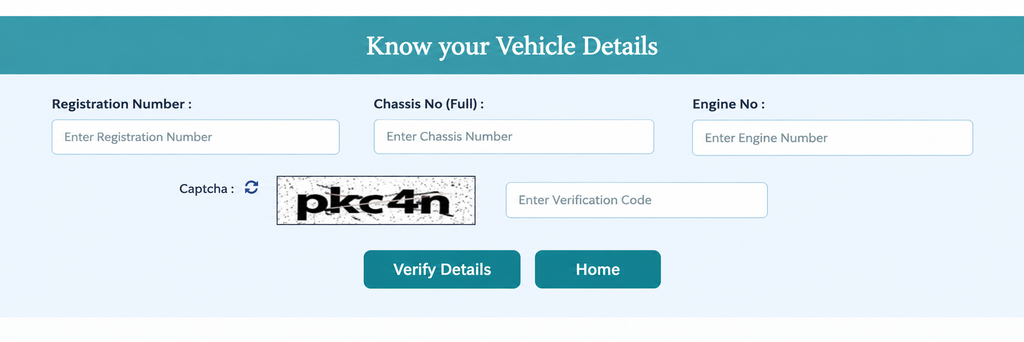
- Click Verify Details.
After that, the full details of your car will appear on the screen, which you can print if necessary.
Information You Can View
| Detail | Description |
|---|---|
| Vehicle Registration Date | When the vehicle was officially registered with the RTO |
| Chassis Number | Unique identifier etched on the vehicle’s chassis |
| Engine Number | Distinct number assigned to the vehicle’s engine |
| Vehicle Class | Category — two-wheeler, car, truck, etc. |
| Fuel Type | Petrol, diesel, electric, etc. |
| Model Number | Specific model identifier |
| Manufacturer Name | Company that produced the vehicle |
| Vehicle Fitness Validity Date | Date until which the fitness certificate is valid |
| PUC Certificate Number | Unique pollution control compliance number |
| Motor Vehicle Tax Validity Date | Deadline for tax payment |
| Insurance Details | Active insurance policy information |
| Vehicle Emission Standard | Compliance norm (e.g., BS-IV, BS-VI) |
| Registration Certificate Status | Active, expired, etc. |
VAHAN, mParivahan, and SMS are government-backed services that offer safe, accurate vehicle records with a completely transparent verification process.
How to Download RC Print (Form 23):
If you require a formal, printable copy of the RC for your car:
- Visit parivahan.gov.in
- Open Online Services → Vahan Related Services.
- Choose your state.
- Enter your vehicle registration number or select your RTO, then click Proceed.
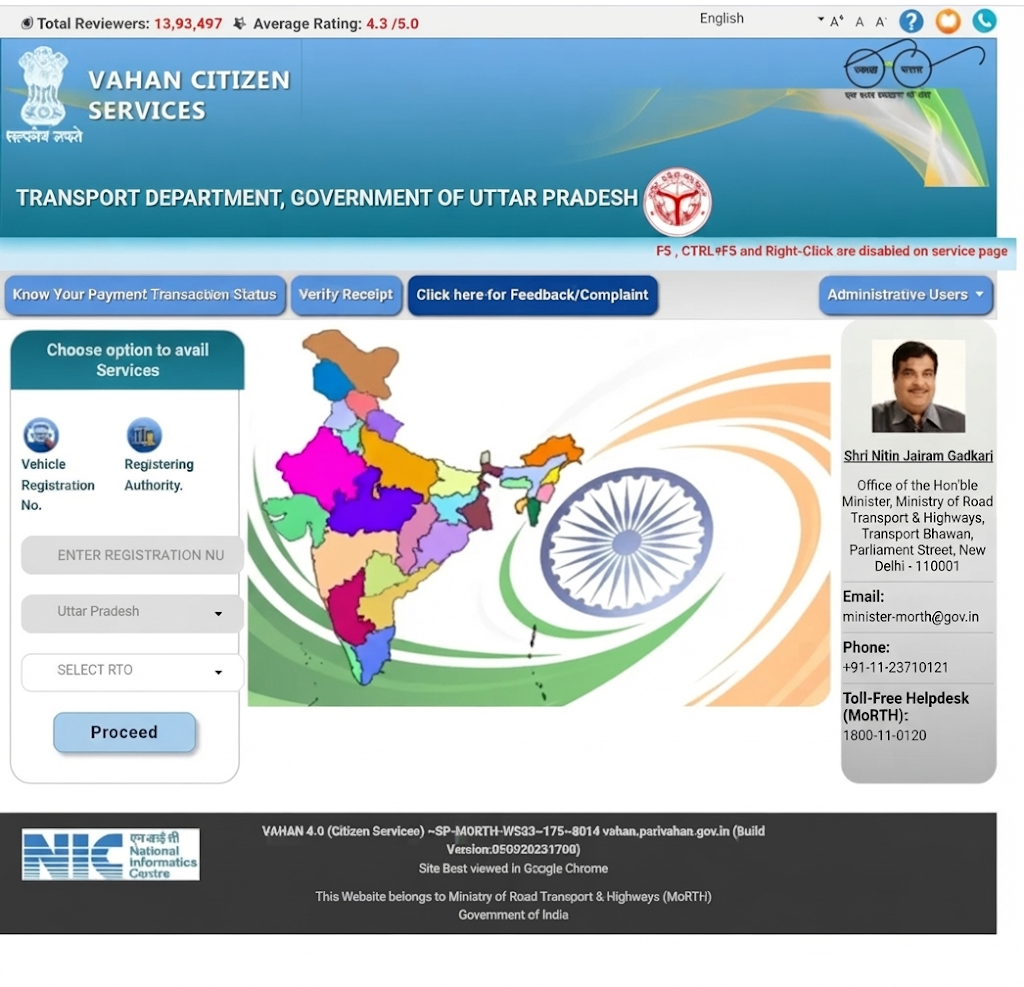
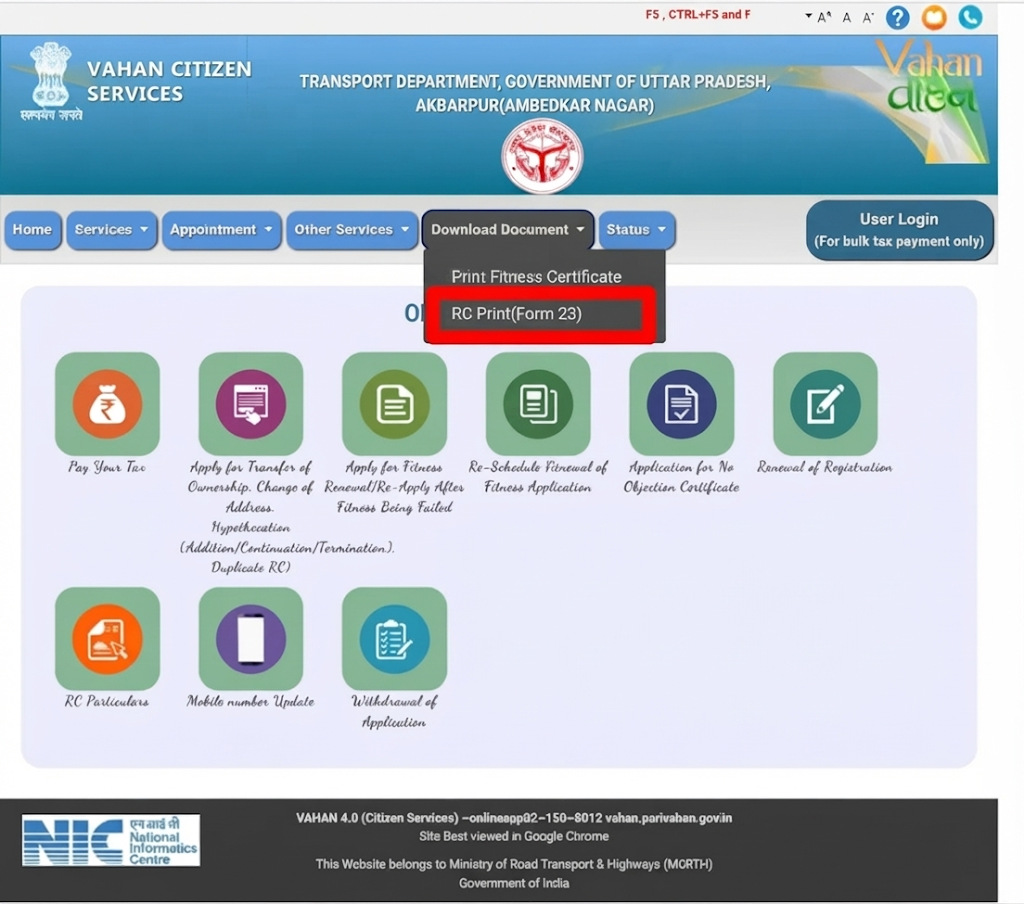
- Click Download Document.
- Select RC Print (Form 23) from the list.
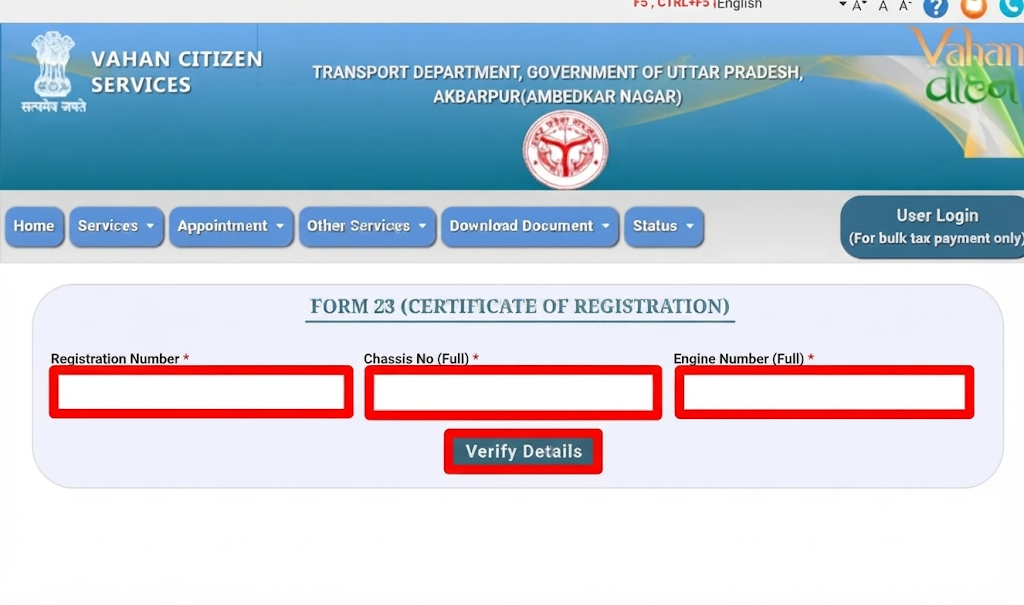
- Enter your vehicle registration number, chassis number, and engine number, then click Verify.
- After verification, your car’s details will show up on the screen.
Understanding Your Vehicle Registration Number:
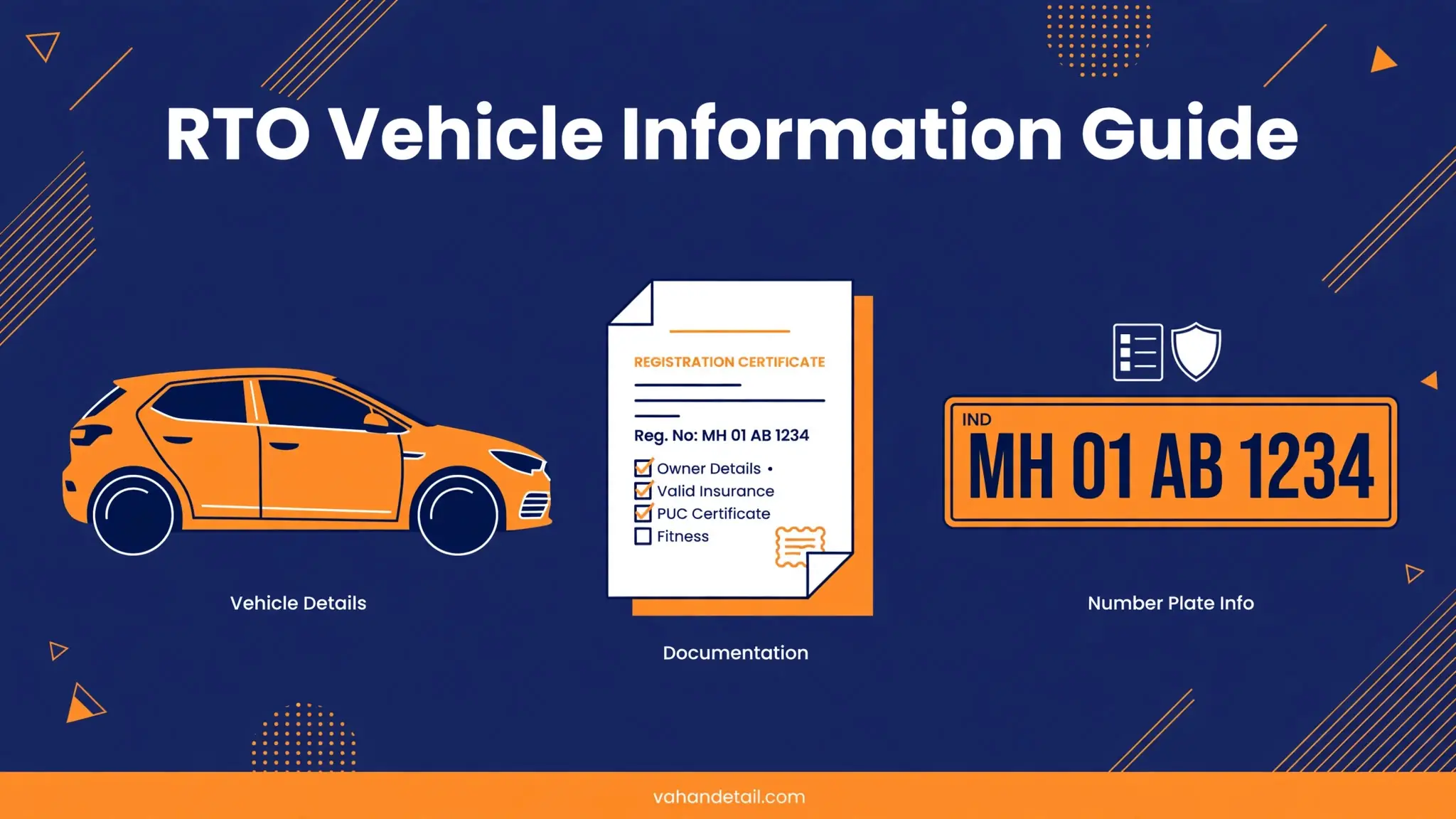
Each car registered in India has a unique number consisting of four separate components.
1. State Code
The state or union territory of registration is indicated by the first two letters.
- MH – Maharashtra
- DL – Delhi
- UP – Uttar Pradesh
- KA – Karnataka
2. RTO Code
The Regional Transport Office (RTO), typically the city or district, is identified by the next two digits.
- MH 01 – Mumbai (Maharashtra)
- DL 10 – West Delhi (Delhi)
- UP 32 – Lucknow (Uttar Pradesh)
- KA 03 – Bengaluru (Karnataka)
3. Alphabet Code
When an RTO requires more number combinations for new automobiles, a two-letter code is placed before the serial number.
4. Unique Serial Number
A four-digit number that is sequentially assigned according to the number of vehicles registered at that RTO.
Full Example: MH 01 AB 1234
- MH – State Code (Maharashtra)
- 01 – RTO Code (Mumbai RTO)
- AB – Alphabet Code
- 1234 – Unique Serial Number
Fancy (VIP) Number: Status, Price & How to Apply
Fancy numbers, sometimes known as VIP numbers, are special registration numbers like 0001, 1111, 7777, 9999, or 0786 that are chosen because they are memorable, distinctive, or thought to be lucky. These are distributed via MoRTH’s official Parivahan Sewa Portal.
How to Apply for a Fancy Number Online
- Go to the official Parivahan fancy number website.
- Become a public user and register.
- Choose your RTO and state.
- Look at the fancy numbers that are available.
- The registration cost must be paid.
- If necessary, take part in an online auction.
- Pay the remaining sum if you win the bid.
- Give your new car the number.
Fancy Number Price in India (Approximate)
| Category | Approximate Price |
|---|---|
| Super Elite Numbers (0001) | ₹5 lakh or more (higher in auctions) |
| Single Digit Numbers (0002–0009) | ₹3–5 lakh |
| Repeated Numbers (1111, 7777, 9999) | ₹1–3 lakh |
| Semi-Fancy Numbers (1234, 1212) | ₹50,000–₹1 lakh |
Note: Depending on demand, final prices may increase during auctions.
State Codes for Vehicle Registration in India:
Vehicle number plates in every Indian state and union territory have a distinct two-letter code.
| State/Union Territory | Code | State/Union Territory | Code |
|---|---|---|---|
| Maharashtra | MH | Himachal Pradesh | HP |
| Delhi | DL | Uttarakhand | UK |
| Uttar Pradesh | UP | Goa | GA |
| Karnataka | KA | Arunachal Pradesh | AR |
| Tamil Nadu | TN | Manipur | MN |
| Rajasthan | RJ | Meghalaya | ML |
| Gujarat | GJ | Mizoram | MZ |
| Madhya Pradesh | MP | Nagaland | NL |
| Bihar | BR | Sikkim | SK |
| Punjab | PB | Tripura | TR |
| West Bengal | WB | Andaman & Nicobar Islands | AN |
| Assam | AS | Chandigarh | CH |
| Kerala | KL | Dadra & Nagar Haveli, Daman & Diu | DD |
| Andhra Pradesh | AP | Jammu and Kashmir | JK |
| Telangana | TS | Ladakh | LA |
| Odisha | OD | Lakshadweep | LD |
| Jharkhand | JH | Puducherry | PY |
| Chhattisgarh | CG | Haryana | HR |
Conclusion:
In India, checking car owner details and RTO vehicle information is now completely digital, safe, and available to all citizens. These government-backed technologies make it easy to confirm ownership, registration status, insurance validity, and more without physically visiting an RTO office, whether you prefer the VAHAN portal, the mParivahan app, or a quick SMS lookup.
Frequently Asked Questions:
Q1. What should I do if my RC details are incorrect?
You can make a correction request online using the Parivahan Portal or contact your local RTO with your car number and the necessary paperwork.
Q2. How can I check RC details without the chassis or engine number?
Use the Parivahan website or mParivahan app to enter your car’s registration number, or text 07738299899 with the format VAHAN.
Q3. How do I update RC details after an ownership transfer?
Use the Parivahan website’s Vehicle Related Services area to apply, or visit your local RTO office with the required transfer paperwork.
Check RTO vehicle owner details online in a few minutes using the official VAHAN portal.
Open the VAHAN portal
Go to vahan.parivahan.gov.in, the official vehicle information portal.
Open Know Your Vehicle Details
Click Know Your Vehicle Details under Information Services.
Enter registration and captcha
Enter the vehicle registration number and the verification code shown.
Verify with OTP
Enter your mobile number and confirm the OTP sent to it.
View the details
Check the owner name, registration, insurance, PUC and other details shown.