Vahan 4.0 Application Status: Track on the New Vahan Portal (2026)
You can check your vahan 4.0 application status online in under two minutes through the "Know Your Application Status" option on the official Vahan portal. You only need the application number from your acknowledgement receipt and the captcha shown on screen. The result shows exactly which stage your application has reached, from submission through to RC dispatch.
What Is the Vahan 4.0 Portal?
Vahan 4.0 is the current version of India’s national vehicle registration system, built by the National Informatics Centre (NIC) for the Ministry of Road Transport and Highways. It replaced the older state-wise versions with one centralised, web-based platform used by RTOs across the country. Services like ownership transfer, change of address, duplicate RC, NOC, and road tax can all be started online on the Vahan portal, and every service generates an application number you can track.
How to Track Your vahan 4.0 application status (Step by Step)
Follow these steps on the official portal:
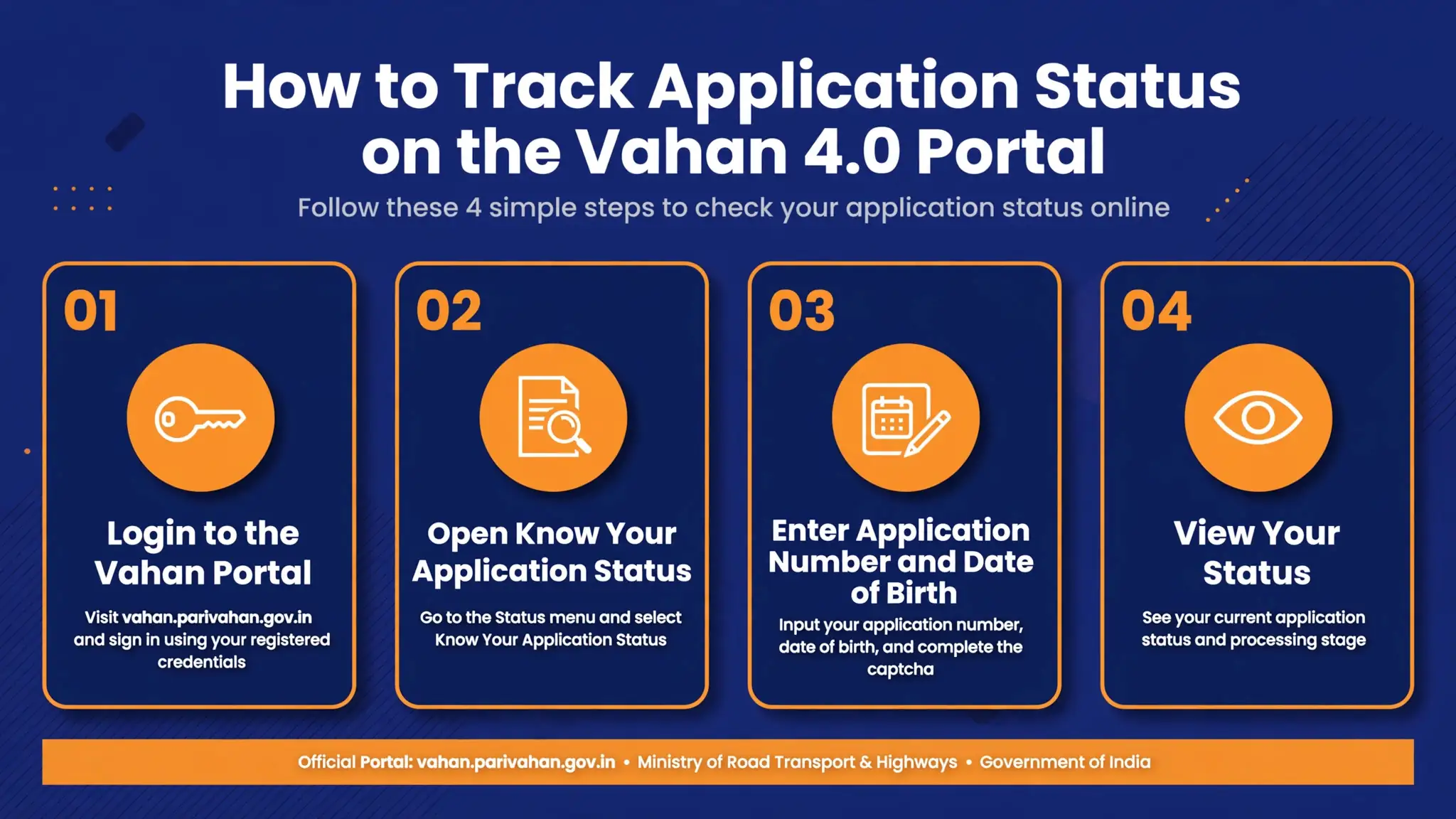
- Go to the Vahan portal. You can also reach it from the Parivahan Sewa portal by choosing Online Services and then Vehicle Related Services.
- Select your state from the dropdown list. If the portal asks, choose your RTO and click Proceed.
- Open the Status menu at the top of the page and click Know Your Application Status.
- Enter your application number exactly as printed on your acknowledgement receipt or payment receipt.
- Fill in the captcha code shown on screen and click Submit.
- Your application timeline appears on screen, showing each completed stage and the one currently pending.
The whole check takes about two minutes. Keep your application number handy before you start, since it is the only identifier the tracker asks for besides the captcha.
Do You Need to Log In First?
For a simple status check, no. The Know Your Application Status option works with just your application number and the captcha. A login becomes useful for more detail: signing in with your registered mobile number and OTP shows a fuller dashboard of your applications, pending fees, RTO appointments, and downloadable receipts. You also need it to file a new application, pay a fee, or re-upload documents the RTO has asked for.
What Changed in Vahan 4.0 Compared to the Older Portal
The new flow differs in four key ways: one national portal instead of state-wise systems, so records move smoothly between RTOs; application-based services, where each service becomes a separately tracked application with its own number; online fee payment, with payment status shown as a tracked stage; and SMS updates, since your application number and status updates are usually sent to your registered mobile number.
Note this article is about tracking an application on the new portal. If you only need a quick vehicle or RC lookup without an application number, our general VAHAN status check guide covers the quick lookup flow instead.
What Each vahan 4.0 application status Stage Means
| Status shown | What it means | What you should do |
|---|---|---|
| Application Submitted / Received | Your application has reached the RTO’s system. | Nothing yet. Wait for the next stage to update. |
| Under Scrutiny | RTO officials are verifying your documents. | Wait. If it stays here for weeks, see the "stuck" section below. |
| Pending Payment | The service fee has not been completed. | Log in and complete the payment on the portal. |
| Approved | Your application has passed all checks. | Wait for printing and dispatch updates. |
| Dispatched | Your RC or document has been posted to your address. | Note the tracking number on screen and follow it. |
| Query Raised / Pending Documents | The RTO needs more documents or corrections. | Log in, read the query, and upload what is asked. |
| Rejected | The application did not meet the requirements. | Read the reason shown, fix the issue, and reapply. |
Stage names can vary slightly by state, but the meaning follows this pattern. You will most often see Submitted, Under Scrutiny, Approved, and Dispatched.

How to Retrieve a Lost Application Number
Your application number is printed on the acknowledgement slip and payment receipt from when you applied, and it is usually sent by SMS to your registered mobile number. If you have lost all of these, search your SMS inbox for Vahan or Parivahan messages sent on the day you applied, then check the email linked to your application. As a last resort, visit your RTO with your vehicle documents and a valid ID, and the staff can trace your application from your registration number. Do not guess the number, since repeated wrong entries can lock you out of the tracker.
Your Status Is Stuck on One Stage: What to Do
- Stuck on Under Scrutiny. Documents are still in the verification queue, or the RTO has raised a query you have not seen. Log in, check for a remark on your application, then visit the RTO with your original documents.
- Stuck on Pending Payment after you paid. Online payments can take up to 48 hours to reflect. Keep your payment receipt and transaction ID. If the status still does not update, contact the RTO or the support contacts on the Parivahan Sewa portal.
- Stuck on Approved. Printing or dispatch is in the queue. If weeks pass with no dispatch update, follow up at the RTO.
- Dispatched but never received. Follow the postal tracking number shown on screen. If it shows delivered but the document never arrived, report it to your RTO and your local post office.
How Long Does Processing Take?
It depends on the service and the RTO. Simple online services with clean documents often move through the early stages within a few working days. Heavier processes like ownership transfer or NOC involve manual verification and can take a few weeks, with postal dispatch adding more time. Treat these as rough expectations, not promises, and trust what your own status screen shows.
For related tracking, see our RC application status tracking guide for RC-specific steps, and buyers of brand new vehicles can follow our new vehicle registration status guide for dealer-filed registrations.
Where do I find my Vahan 4.0 application number?
It is printed on the acknowledgement slip and payment receipt from when you applied, and it is usually sent by SMS to your registered mobile number on the day of application. The Know Your Application Status tracker cannot find your record without it.
Can I check vahan 4.0 application status without logging in?
Yes. The Know Your Application Status option needs only your application number and the captcha. You only need the mobile-number login for a fuller dashboard, or to pay fees and upload documents.
What does “Under Scrutiny” mean on Vahan 4.0?
It means RTO officials are checking your submitted documents for accuracy. It is a normal stage. If it stays unchanged for several weeks, check for a query on your application or visit the RTO with your original documents.
I paid the fee but the status still shows Pending Payment. What should I do?
Wait up to 48 hours, since payment reconciliation on the portal can lag. Keep your payment receipt and transaction ID. If the status still does not update, contact the RTO or the support contacts on the Parivahan Sewa portal.
Is Vahan 4.0 the same as the old Vahan site or mParivahan?
Vahan 4.0 is the current national version of the Vahan system at vahan.parivahan.gov.in, replacing the older state-wise versions. mParivahan is the mobile app for viewing your digital RC and driving licence. For driving licence applications, which run on a different system, use the Sarathi portal instead.
Track your Vahan 4.0 application on the new national portal in six steps.
Go to the Vahan portal
Open vahan.parivahan.gov.in, or reach it via Parivahan Sewa Online Services.
Select your state
Choose your state, and your RTO if asked, then click Proceed.
Open the Status menu
Click Status at the top and choose Know Your Application Status.
Enter your application number
Type it exactly as printed on your acknowledgement or payment receipt.
Fill in the captcha and submit
Enter the captcha code and click Submit.
View your application timeline
See each completed stage and the one currently pending.