Transport Permit Application Status: Check Goods and All India Permit Status Online (2026)
If you applied for a transport permit recently, you can check your permit application status online in a couple of minutes. The Vahan portal on Parivahan lets you track your application with your application number, from “received” all the way to “permit issued”. No RTO visit needed.
This guide covers the exact steps, what each status stage means, the main permit types, and why applications get delayed or rejected.
How to Check Your Permit Application Status Online
The status check runs through the Vahan portal, Parivahan’s vehicle-services arm, and works for all permit types.
Step 1: Open the Vahan portal
Go to the official Vahan portal. Always use the official government address. Permit scams often run on lookalike sites, so check the URL carefully.
Step 2: Open the Status menu
On the top navigation bar, click Status. From the dropdown, choose Know Your Application Status.
Step 3: Enter your application number
Type in the application (or reference) number from when you applied and paid the fee. Some states also accept the vehicle registration number instead.
Step 4: Solve the captcha and submit
Enter the captcha code shown on screen and click Submit. The portal will display your application’s current stage.
Step 5: Download the permit once issued
If your status shows “approved” or “permit issued”, open the Permit Services section and click Print Permit. Enter your registration number and application number, then download the PDF. Keep a printed copy in the vehicle along with the digital one.

Permit Application Status: What Each Status Stage Means
When you check your status, the portal shows a short stage label. Here is what the common ones mean:
- Application received: your application and fee are in the system. Wait for verification to begin.
- Under verification: the RTO is checking your documents and records. Nothing to do unless the RTO contacts you.
- Pending with approving authority: documents verified, the officer’s approval is awaited. Follow up if it stays stuck for weeks.
- Approved: the permit is granted. Download it from the portal.
- Permit issued: the permit document is issued. Print and carry it in the vehicle.
- Rejected or returned: the application was refused or sent back. Read the remark, fix the issue, and re-apply.
Straightforward applications usually move from submitted to issued within a few days to two weeks; national permits can take longer because of cross-state authorisations.
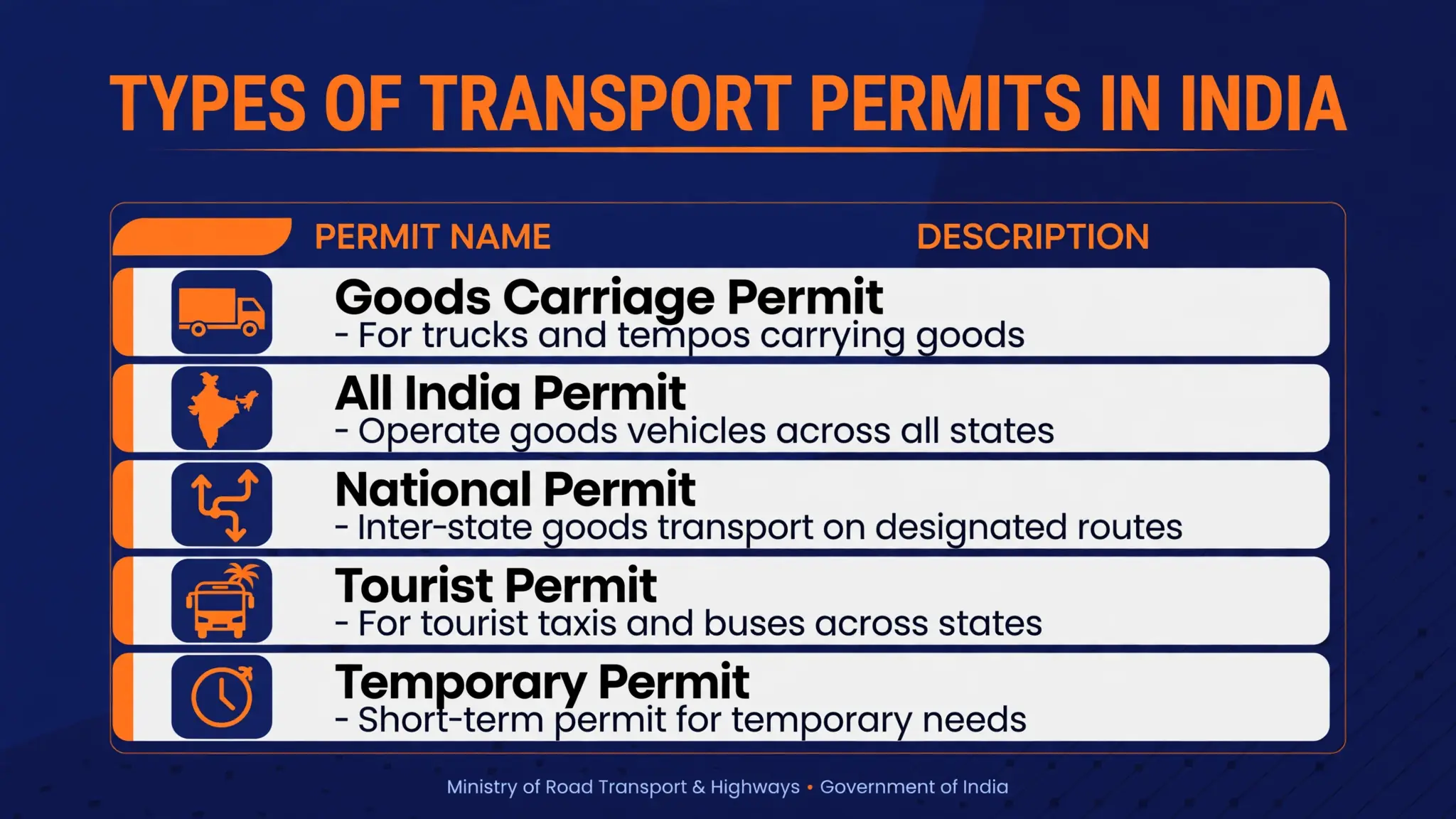
Types of Transport Permits You Can Track
Goods Carrier Permit (State Permit): For trucks, LCVs, pick-ups and other commercial goods vehicles operating within one state. The most common permit for first-time commercial vehicle owners.
National Permit (All India Goods Permit): Lets goods vehicles cross state borders, covering a minimum of 4 continuous states including the home state (most operators choose “throughout India”). The vehicle is usually required to be under 12 years old from its date of registration (15 years for multi-axle vehicles). Typically valid for 5 years.
All India Tourist Permit (AITP): For tourist buses, tempo travellers, luxury coaches and tourist cars operating across states. Tourist vehicles follow colour-coding rules, usually white with blue markings.
Stage Carriage Permit: For buses running on fixed routes, where passengers board and get off at different stops.
Contract Carriage Permit: For vehicles hired under a contract, such as school vans, company shuttles and hired taxis.
Temporary Permit: Short-term authorisation for special or one-time use, valid for a limited number of days.
The rule of thumb is simple: staying inside one state means a state permit, while crossing state borders needs a national or All India permit.
Documents the RTO Verifies Before Issuing Your Permit
A permit application status often stalls at “under verification” for one reason: documents. Make sure these are all valid before applying:
- Registration Certificate (RC) of the vehicle
- Valid insurance policy
- Fitness certificate (mandatory for transport vehicles)
- Valid Pollution Under Control (PUC) certificate
- ID proof and address proof of the owner
- Road tax and green tax clearance receipts
Even a small mismatch, like a name spelled differently on the RC and the ID proof, or an expired insurance policy, can get the application returned. If your status stays on verification for more than a couple of weeks, visit the RTO with the originals and ask what is pending.
Renewal Timelines
Most permits are valid for 5 years, though state permits can be issued for 1 to 5 years depending on the state, and temporary permits are valid only for the short period granted. Start your renewal before the expiry date. An expired permit can attract fines, and a vehicle caught operating without a valid permit may be seized.
Renewal follows the same online route as a fresh application: log in to the Parivahan Sewa portal, choose the permit renewal service, upload updated documents (insurance, fitness certificate, PUC), pay the fee online and submit. Fees depend on the vehicle class and state, and the exact amount is shown on the portal before payment. Keep the new application number so you can track the renewal’s permit application status the same way.
Why a Permit Application Gets Delayed or Rejected
- Expired supporting documents: Insurance, fitness certificate or PUC expired at the time of application. The portal checks validity automatically.
- Unpaid road tax or challans: Pending road tax dues or unpaid e-challans against the vehicle can hold the file. Clear them and re-check.
- Document mismatches: Differences in owner name, chassis number or engine number between the RC and the uploaded documents.
- Vehicle age limits: A goods vehicle older than 12 years (15 for multi-axle) generally cannot get a national permit.
- Wrong permit type selected: Applying for a state permit when your route crosses states, or vice versa.
- Payment not confirmed: If your status does not appear at all, check the payment status on the portal before paying again.
If your application was rejected, read the portal’s remark and fix exactly what it says before re-applying.
Related Status Checks on Parivahan
- If you also applied for a registration certificate, track it with the RC application status check.
- To see the overall record of your vehicle, including permit validity and type, use the VAHAN status check by entering your registration number.
- For a brand new vehicle waiting on its first registration and permit, the new vehicle registration status tracker covers that process.
How do I check my transport permit application status online?
Visit the Vahan portal, click Status, choose Know Your Application Status, enter your application number, solve the captcha and submit.
What is the application number for a permit status check?
It is the reference number generated when your online permit application and fee payment were completed. If you applied at an RTO counter, it is printed on the fee receipt.
How long does a permit application take to be approved?
Simple state permits are often issued within a few days to two weeks. National permits can take longer because of cross-state authorisations.
What is the difference between a state permit and a national permit?
A state permit allows your commercial vehicle to operate only within the issuing state. A national permit allows inter-state operation across a minimum of 4 continuous states including the home state.
Can I download my permit once the status shows approved?
Yes. On the Vahan portal, open Permit Services, click Print Permit, enter your registration number and application number, and download the PDF. Keep both a digital and a printed copy.
My permit application status says rejected. What now?
Read the rejection remark on the portal, fix the exact issue (usually an expired document, unpaid tax or a data mismatch), and re-apply.
Track your transport permit application on the Vahan portal in five steps.
Open the Vahan portal
Go to vahan.parivahan.gov.in, the official government address.
Open the Status menu
Click Status in the top navigation and choose Know Your Application Status.
Enter your application number
Type the application or reference number from your fee receipt.
Solve the captcha and submit
Enter the captcha code and click Submit to view the current stage.
Download the permit once issued
In Permit Services, click Print Permit and download the PDF.