Vahan RC Transfer Status Check Online: Track Ownership Transfer (2026)
You can check your Vahan RC transfer status online on the Parivahan Vahan portal using your application number. Go to vahan.parivahan.gov.in, select “Know Your Application Status”, enter your application number, and the portal will show where your ownership transfer stands, from pending verification at the RTO to approved and RC dispatched.
What Is the Vahan RC Transfer Status
When you sell or buy a used vehicle, ownership must be transferred on the Registration Certificate (RC) at the RTO. In most states this application is filed online through the Vahan portal, where you submit Form 29 (notice of transfer) and Form 30 (application for intimation and transfer of ownership), upload documents, and pay the prescribed fee. The portal then issues an application number.
The “Vahan RC transfer status” is the live record of that application as it moves through the RTO: document verification, approval, and finally the issue of the RC in the new owner’s name. If you have already read our how to transfer vehicle ownership online guide, this page covers the other half of the process, tracking it to completion.
How to Check Vahan RC Transfer Status Online (Step by Step)
- Open vahan.parivahan.gov.in in your browser.
- Click on “Know Your Application Status” on the Vahan homepage.
- Enter your application number exactly as shown on your acknowledgement receipt.
- Enter the captcha and click Submit.
- The portal shows the transaction details, including the service type (transfer of ownership), the RTO, and the current status.
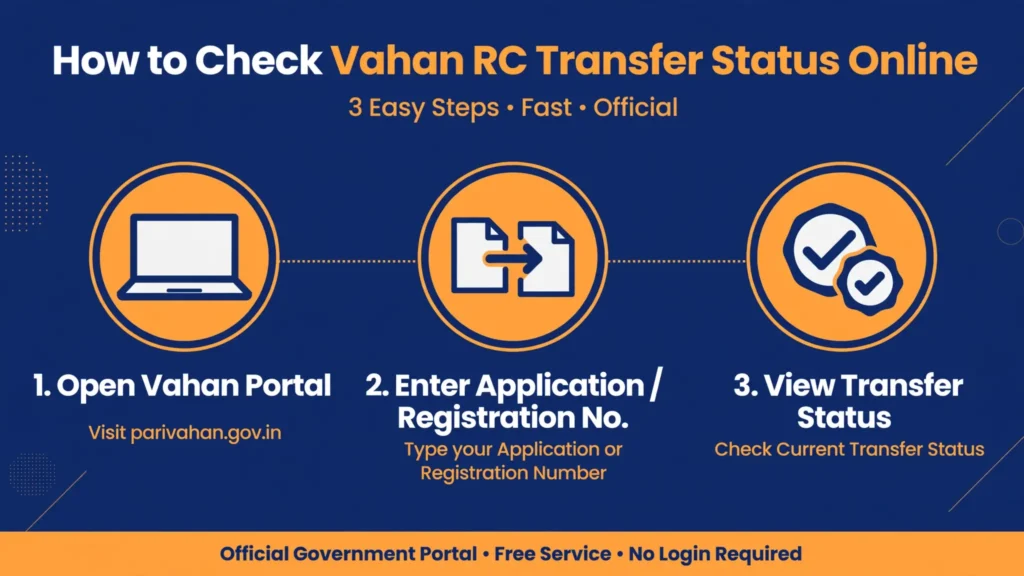
Check your Vahan RC transfer status online in 5 quick steps using your application number on the Parivahan Vahan portal.
Open the Vahan portal
Open vahan.parivahan.gov.in in your browser.
Click Know Your Application Status
Click on “Know Your Application Status” on the Vahan homepage.
Enter your application number
Enter your application number exactly as shown on your acknowledgement receipt.
Enter the captcha and submit
Enter the captcha and click Submit.
View your transfer status
The portal shows the transaction details, including the service type (transfer of ownership), the RTO, and the current status.
If you applied through parivahan.gov.in by selecting your state first, the same “Know Your Application Status” link is available after you choose “Vehicle Related Services” and your state. Keep your
acknowledgement receipt safe, because the application number is the only key to tracking.
Understanding RC Transfer Status Stages
Here is what each stage on the portal means in plain language.
| Status shown | What it means |
|---|---|
| Application under processing | Your transfer request is in the RTO queue and verification has not started. Normal right after applying. |
| Pending verification at RTO | The RTO is verifying the seller and buyer documents, and checking for pending challans, tax dues, or hypothecation on the vehicle. |
| Objection raised | The RTO needs something fixed, a missing NOC, an unclear document, or unpaid dues. Read the remark and resolve it. |
| Approved | The transfer is approved. The RC will be updated in the new owner’s name. |
| RC generated / dispatched | The updated RC has been issued and sent for delivery to the registered address. |
What “Pending Verification” Means for Transfers
Transfer verification is slower than most other Vahan services because the RTO checks more than just your documents. The officer confirms that the vehicle’s tax is paid, that there are no pending challans, that any hypothecation (loan) is either cleared or properly transferred, and that the seller’s signature on Form 29 and Form 30 is genuine. Each of these checks can add days, which is why transfers take longer than a simple RC download.
What to Do If an Objection Is Raised
Read the exact remark on the portal. The most common objections in ownership transfers are: a missing or expired NOC (needed when the vehicle is registered in a different state), unpaid road tax, a pending challan on the vehicle, or a mismatch between the chassis or engine number on the forms and the RC. Clear the underlying issue, then re-upload the corrected document or visit the RTO with originals and your application number.
How Long Does RC Ownership Transfer Take
Timelines vary by state and RTO workload. As a rough guide:
- Same RTO, clean documents, no dues: usually 2 to 3 weeks.
- Different RTO or different state (NOC involved): usually 3 to 6 weeks.
- Cases with pending challans, tax dues, or hypothecation issues: longer, until the dues are cleared.
If your status has not moved for more than 45 days and there is no objection shown, contact the RTO where you filed the application, quoting your application number. For phone and email support options, see our Parivahan helpline guide.
Transfer Status vs RC Status Check
These answer different questions:
- RC transfer status (this page): “Where is my pending ownership transfer application?” Needs the application number.
- RC status check: “What does the RC currently show for this vehicle?” Needs the vehicle registration number. Use our RC status check guide if you want to see whose name the RC currently carries.
Once the transfer is complete, the vehicle number stays the same but the RC shows the new owner. You can also track the application through the general Vahan application status page, which covers all vehicle services.
Documents That Commonly Delay Transfers
Make sure these were in order before you applied, and if an objection appears, these are the first things to re-check:
- Form 29 and Form 30, signed by both seller and buyer.
- Original RC of the vehicle.
- Valid insurance in the buyer’s name (or transferred).
- Valid PUC certificate.
- Address proof of the buyer.
- NOC from the original RTO if the vehicle is from another state.
- Tax payment receipts, with no dues pending.
How can I check my RC transfer status without the application number?
The Vahan status page needs the application number. If you lost the receipt, check the SMS or email sent to your registered mobile number, or visit the RTO with your ID proof and vehicle details to have it looked up.
The transfer shows approved, but the RC still shows the old owner. Why?
Approval and RC printing are separate steps. After approval, the updated RC is generated and dispatched, which takes additional days. Re-check after a week; if the RC still shows the old name, contact the RTO.
Do both buyer and seller need to sign for the transfer?
Yes. Form 29 (notice of transfer) and Form 30 (application for transfer) both require the signatures of the transferor (seller) and the transferee (buyer).
Can I track a transfer if the dealer applied on my behalf?
Yes, as long as you have the application number from the acknowledgement receipt. Ask the dealer for it if they filed the application for you.
What happens if the vehicle has a pending challan during transfer?
The RTO will usually raise an objection or hold the transfer until the challan is paid. Clear all pending challans before applying to avoid delays.
Is there a fee for checking RC transfer status online?
No. Checking the status on the Vahan portal is free.