How to Check If a Vehicle Is Blacklisted on the Vahan Portal (2026)
Yes, you can check whether a vehicle is blacklisted through the Vahan portal‘s vehicle-details service before you buy it or renew its documents. A blacklisted vehicle carries a flag in the national vehicle registry, usually because of unpaid challans, pending taxes, a police case, or a court order, and that flag blocks transfers, fitness renewals, and sometimes even insurance claims until it is cleared. The check takes under two minutes and can save you from buying someone else’s legal problem.
What “Blacklisted” Means for a Vehicle
A blacklisted vehicle is one against which a competent authority, the RTO, traffic police, a court, or another government body, has recorded an adverse entry in the Vahan database. It is not the same as a vehicle with a loan (hypothecation), though the two can overlap. A blacklist flag typically freezes key transactions on the vehicle: ownership transfer gets held up, fitness certificate renewal can be refused, and permits may not be issued. The vehicle is not automatically seized, but it cannot move cleanly through the system until the underlying issue is resolved and the flag is removed by the authority that placed it.
How to Check Blacklist Status on the Vahan Portal: Step by Step
- Open the Vahan portal (the national vehicle registry under the Parivahan Sewa portal).
- Click on “Know Your Vehicle Details” in the online services menu.
- Enter the vehicle’s registration number exactly as on the number plate.
- Fill in the captcha verification and submit.
- Review the vehicle details shown: registration data, owner serial, fuel type, and, where applicable, the blacklist status flag.
If the vehicle is flagged, the record indicates the blacklisted status. The portal may not always spell out the full reason in citizen view, in which case the registering RTO holds the detailed entry. Note the exact registration number and take a screenshot for your records before you proceed further.
Follow these five steps on the Vahan portal to check whether a vehicle is blacklisted.
Open the Vahan portal
Open the Vahan portal (the national vehicle registry under the Parivahan Sewa portal).
Click Know Your Vehicle Details
Click on “Know Your Vehicle Details” in the online services menu.
Enter the registration number
Enter the vehicle’s registration number exactly as on the number plate.
Fill in the captcha
Fill in the captcha verification and submit.
Review the vehicle details
Review the vehicle details shown: registration data, owner serial, fuel type, and, where applicable, the blacklist status flag.
The 6 Common Reasons a Vehicle Gets Blacklisted
- Unpaid traffic challans. A pile of unsettled e-challans is the most common trigger, especially after enforcement drives. Check and clear these on the e-Challan portal first.
- Pending road tax or other dues. Unpaid state taxes, permit fees, or compounding fees can lead to a flag.
- FIR or police case. If the vehicle is linked to a criminal case, an accident investigation, or reported stolen, the police can have it blacklisted.
- Court stay or order. A court directive, for example in a loan default or ownership dispute, freezes the vehicle’s record.
- Permit and fitness violations. Commercial vehicles running without valid permits or fitness certificates can be flagged during enforcement.
- Hypothecation and finance disputes. An unresolved financier lien or a disputed loan settlement can keep an adverse entry alive even after the owner believes the matter is closed.
Any one of these can sit quietly on the record for months, which is why the check matters most when money is about to change hands.

What to Do If the Vehicle You Want to Buy Is Blacklisted
Stop the purchase process until the flag is cleared. A blacklisted vehicle cannot be transferred cleanly, which means the RC stays in the seller’s name while you drive it, the worst possible position for a buyer. Ask the seller to clear the issue first: challans and tax dues can be paid online and usually clear within a few working days, while police or court matters take as long as the case does. Get the seller to show you a fresh Vahan vehicle-details printout with no flag before you pay anything. Never accept “the RTO will clear it after transfer,” because the transfer itself is what the flag blocks.
For a complete pre-purchase routine, pair this check with our Vahan vehicle history report guide and, for two-wheelers, the used-bike buyer checklist. A Vahan status check alongside the blacklist lookup gives you the full picture of the vehicle’s standing.
How Owners Get a Blacklist Flag Removed
Removal is always done by the authority that placed the flag, not by the vehicle owner directly:
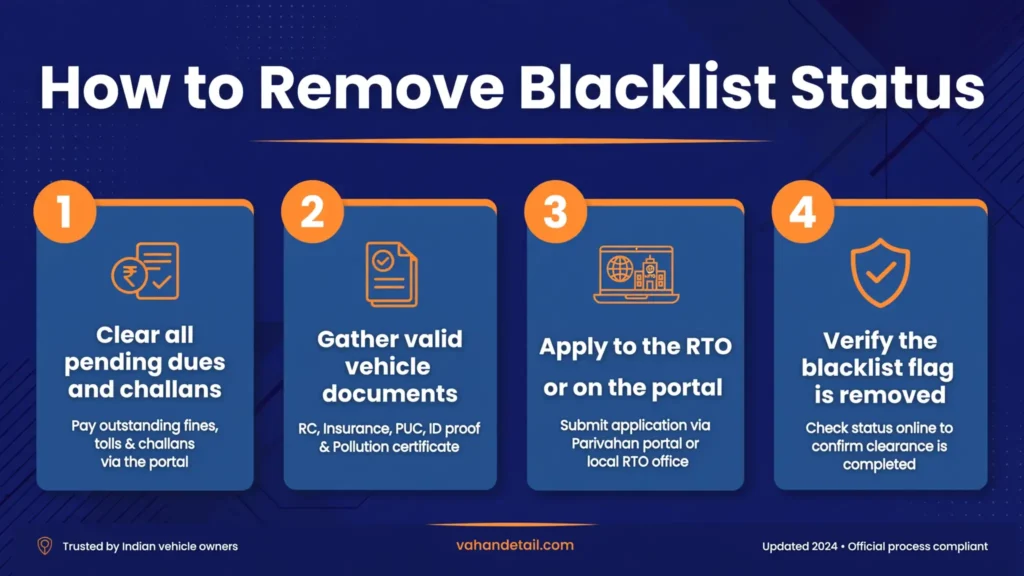
- Find out who flagged it. Visit the registering RTO with the RC and ask for the blacklist entry details: which authority placed it and for what reason.
- Resolve the underlying issue. Pay pending challans and taxes online, obtain the police clearance or court order as applicable, or settle the financier dispute with written proof.
- Submit proof to the flagging authority. Carry payment receipts, the NOC from the police or court, or the financier’s clearance letter to the RTO or the authority concerned.
- Apply for removal. File the request for blacklist removal with the supporting documents. The authority verifies and lifts the flag in the Vahan database.
- Verify the clearance. Re-run the “Know Your Vehicle Details” check on the Vahan portal and confirm the flag is gone before you proceed with any transfer or renewal.
Timelines vary with the reason. Paid-up challan flags often clear within days of payment reflecting in the system; police and court-linked flags take as long as the underlying proceeding. Keep every receipt until the portal shows a clean record.
Frequently Asked Questions
How do I check if a vehicle is blacklisted online?
Open the Vahan portal, use “Know Your Vehicle Details,” enter the registration number, and complete the captcha. The result shows the vehicle’s record including any blacklist flag.
Can a blacklisted vehicle be transferred to a new owner?
Practically no. The flag blocks ownership transfer at the RTO. The seller must get the flag removed first, and you should verify a clean Vahan record before paying.
What is the difference between blacklisted and hypothecated?
Hypothecation means a financier has a loan lien on the vehicle, which is normal and cleared with a loan NOC. Blacklisting is an adverse entry by an authority (police, court, RTO) that freezes transactions until the underlying issue is resolved.
How long does it take to remove a blacklist flag?
It depends on the cause. Challan and tax-dues flags often clear within a few working days of payment. Police case or court-order flags last as long as the case or until the competent authority issues clearance.
Will a blacklisted vehicle fail a fitness test renewal?
It can. RTOs generally do not process fitness renewals, transfers, or permits for flagged vehicles until the blacklist entry is cleared.
Does the Vahan portal always show the reason for blacklisting?
Not always in the public citizen view. If the flag appears without a clear reason, visit the registering RTO with the RC to get the entry details: the flagging authority and the cause.