Karnataka Vehicle Status Check: RC and Challan Status Online (2026)
A karnataka vehicle status check takes just a few minutes online. You can look up your RC details, registration validity and pending challans on the official VAHAN portal and the e-Challan portal, with no visit to the RTO required. Karnataka vehicle owners also have state transport department services through the regional RTOs and Karnataka traffic police systems for Bengaluru and other cities.
This guide walks you through every way to check your Karnataka vehicle status online, explains what the results mean, and answers the most common questions vehicle owners in the state ask.
Karnataka Vehicle Status Check on the VAHAN Portal
The VAHAN portal is the national vehicle registry run by the Ministry of Road Transport and Highways. Every vehicle registered at a Karnataka RTO, from a KA-01 Bengaluru bike to a KA-51 commercial truck, has its RC record here. This is the most reliable place to start your karnataka vehicle status check.
Follow these steps:
- Open vahan.parivahan.gov.in in your browser and look for the "Know Your Vehicle Details" option on the homepage.
- Click it. The portal will ask you to log in or register with your mobile number. You will receive an OTP (one-time password) on that number, which is how VAHAN confirms your identity.
- Enter the OTP to sign in. After login, you will see a form asking for the vehicle registration number.
- Type your registration number carefully (for example, KA05MN1234), then submit.
- Your vehicle's RC record appears on screen. Check the owner name, chassis number, engine number, fuel type, registration date, RC validity and fitness details.
If anything on the record does not match your physical RC smart card or your vehicle, visit your registering RTO with the RC and supporting documents to get it corrected. Small data entry errors are more common than people expect, especially for older registrations.
For a broader national overview of the same process, see our guide on how to check Vahan status online.

Open vahan.parivahan.gov.in and find Know Your Vehicle Details on the homepage
Open the national vehicle registry in your browser and look for the Know Your Vehicle Details option.
Log in with your mobile number and the OTP you receive
You will receive an OTP on that number, which is how VAHAN confirms your identity.
Enter the Karnataka registration number (e.g. KA05MN1234) and submit
Type your registration number carefully, then submit.
Review the RC record
Owner name, chassis and engine numbers, fuel type, registration date, RC validity.
Flag mismatches
Visit your registering RTO with the RC to correct data errors.
Checking Pending Challans for a Karnataka Vehicle
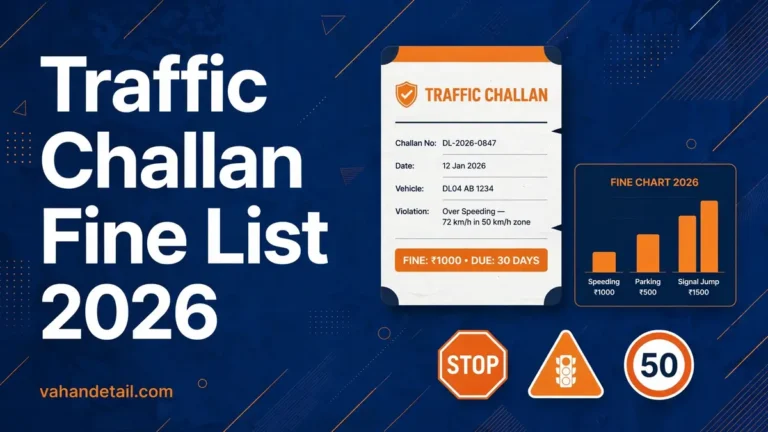
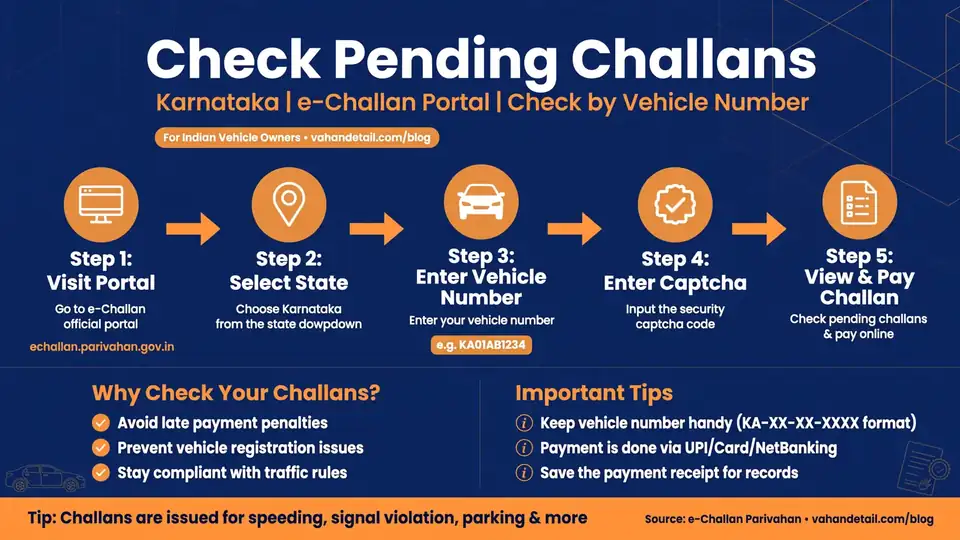
Pending traffic challans are a separate record from your RC details. In Karnataka, challans issued by the Bengaluru Traffic Police (BTP), Karnataka traffic police and traffic cameras across the state appear on the e-Challan portal.
To check pending challans:
- Open echallan.parivahan.gov.in and choose the "Check Challan Status" option.
- Search by vehicle number, challan number or driving licence number. For a quick check, vehicle number is usually the easiest.
- Enter your Karnataka registration number and the captcha, then submit.
- The portal lists all unpaid challans against the vehicle: offence type, date and place of violation, issuing authority and the fine amount.
- If you want to pay, select the challans and complete payment online through the same portal. Keep the receipt and transaction reference safe.
A few practical notes for Karnataka owners. Bengaluru has an extensive camera enforcement network, and violations like signal jumping or wrong-lane driving are often captured automatically, so a challan can appear days after the actual incident. Two-wheelers registered in one district but fined in another still show up under the same vehicle number, because the system is national. Before buying a used Karnataka vehicle, always run this challan check too, so you do not inherit the previous owner's unpaid fines.
Our state-wise challan portal guide covers Karnataka alongside other states if you want to compare.
Checking Karnataka RC Renewal and Fitness Status
Your vehicle status is only complete if you confirm that the RC itself is still valid. On the VAHAN record you pulled earlier, look at the "Registration Validity" or "RC Valid Upto" field. For most private cars and two-wheelers, the initial registration is valid for 15 years, after which the RC must be renewed every 5 years. If the expiry date has passed, the RC is lapsed and needs renewal at your RTO.
For transport vehicles (commercial taxis, goods carriers, buses), there is one more document to check: the fitness certificate. Transport vehicles need a valid fitness certificate, and fitness renewal is required periodically throughout the vehicle's life. A Karnataka goods vehicle running with expired fitness can be stopped and fined, and it can also create problems during insurance claims.
The VAHAN portal shows fitness validity in the vehicle record for transport vehicles. You can also check the application status for any renewal you have already applied for on the Parivahan Sewa portal under the vehicle-related services section. If you applied for RC renewal or a fitness certificate and it is pending, that portal shows where the application stands.
What Your Status Results Mean
When you run these checks, you will see several fields and statuses. Here is what the important ones mean:
| Field / Status | What it means |
|---|---|
| Registration Number | Your vehicle's unique number as issued by the Karnataka RTO |
| Owner Name | The registered owner's name; should match your ID documents |
| Chassis / Engine Number | The vehicle's identification numbers; match them with your RC |
| Registration Validity | The date until which your RC is valid; renew before it expires |
| Fitness Valid Upto | Validity of the fitness certificate (transport vehicles only) |
| PUC Validity | Pollution Under Control certificate status; must be current |
| Blacklist / Hold Status | Shows whether the vehicle is flagged (stolen, court hold, finance hold) |
| Pending Challans | Unpaid traffic fines linked to the vehicle number |
| Insurance Validity | Whether the vehicle's insurance policy is active |
| NOC Status | Whether a No Objection Certificate was issued (relevant if the vehicle moved states) |
If you see a "blacklisted" or hold flag you did not expect, do not panic. It can be a data issue, an unpaid challan block, or an old finance entry. Your registering RTO can tell you exactly what the hold is and what document clears it. For a general walkthrough of RC status checks across India, our RC status check guide explains each field in more detail.
How can I check my Karnataka vehicle RC details online for free?
Use the Know Your Vehicle Details service on vahan.parivahan.gov.in. Log in with your mobile number and OTP, enter the registration number, and the RC record appears. The service is free.
Where do I check pending traffic challans for a Karnataka vehicle?
On echallan.parivahan.gov.in, search by vehicle number, challan number or driving licence number. Challans issued by Bengaluru Traffic Police and Karnataka traffic police across the state appear there.
Can I check the status of a vehicle registered in another Karnataka district?
Yes. Both the VAHAN portal and the e-Challan portal work for any Karnataka registration number, no matter which district’s RTO issued it. The records are linked at the state and national level.
What should I do if my RC validity has expired?
Apply for RC renewal at your registering RTO. Private vehicles get an initial 15-year registration, then renewal every 5 years. Driving with an expired RC can lead to fines, so renew before or soon after expiry.
My vehicle shows a challan I never received. What should I do?
Camera-detected violations are often recorded without the driver being stopped, so the challan can be genuine even if you never heard about it. Check the violation details on the e-Challan portal. If the details are wrong, the portal has a grievance or dispute option, or you can approach the issuing traffic authority in Karnataka.
Is the Karnataka transport department website different from Parivahan?
Karnataka’s RTO services are integrated with the national Parivahan system, so most online services (RC, driving licence, permits, challans) run through parivahan.gov.in, vahan.parivahan.gov.in and the e-Challan portal. Your local Karnataka RTO handles in-person services and document verification.
Key Takeaways
A karnataka vehicle status check is a three-part job: RC details on the VAHAN portal via Know Your Vehicle Details with OTP login, pending challans on the e-Challan portal by vehicle number, and a careful look at RC and fitness validity dates. Run these checks before buying a used vehicle, before long trips, and at least once a year for your own vehicles. Keep your RC, PUC, insurance and fitness current, and clear pending challans promptly so small fines never turn into bigger problems.