Check FASTag Status Online: Active, Blacklisted or Low Balance (2026)
A FASTag status check tells you whether your tag is active, blacklisted, running on low balance, suspended or closed. You can do the check online in a couple of minutes through your issuer bank's FASTag portal, the MyFASTag app, or the NETC FASTag information pages, using your vehicle number or registered mobile number. Knowing your status before a highway trip saves you from the double toll charge that applies when a tag is not working at the plaza.
How to Do a FASTag Status Check Online
1. Your issuer bank's FASTag portal or app. Every FASTag is issued by a bank or payment company, and your status lives with your issuer, so this is the most accurate place to check. Log in with your registered mobile number and OTP, then open the Tag Status or Account Summary section to see each tag's status, linked vehicle number and wallet balance. If you cannot remember your issuer, the official NETC FASTag pages list the member banks and issuer details.
2. The MyFASTag app by IHMCL. The MyFASTag app by IHMCL (Indian Highways Management Company Limited, an NHAI company) shows your tag status, balance and transaction history, and lets you recharge and raise service requests. The official portal is the IHMCL FASTag portal.
3. Check while recharging. Most issuer portals show the tag status on the recharge screen itself, next to the tag, before you pay. Start a recharge for your vehicle number and the status appears right there. For a full walkthrough, see our guide to FASTag recharge online.
Do this check the day before a long trip, not at the toll booth.
Use your issuer bank’s FASTag portal or app
Log in with your registered mobile number and OTP, then open Tag Status or Account Summary.
Use the MyFASTag app by IHMCL
Shows tag status, balance, transaction history and lets you recharge.
Check while recharging
Most issuer portals show tag status on the recharge screen before you pay.
What Each FASTag Status Means
| Status | What it means | What to do |
|---|---|---|
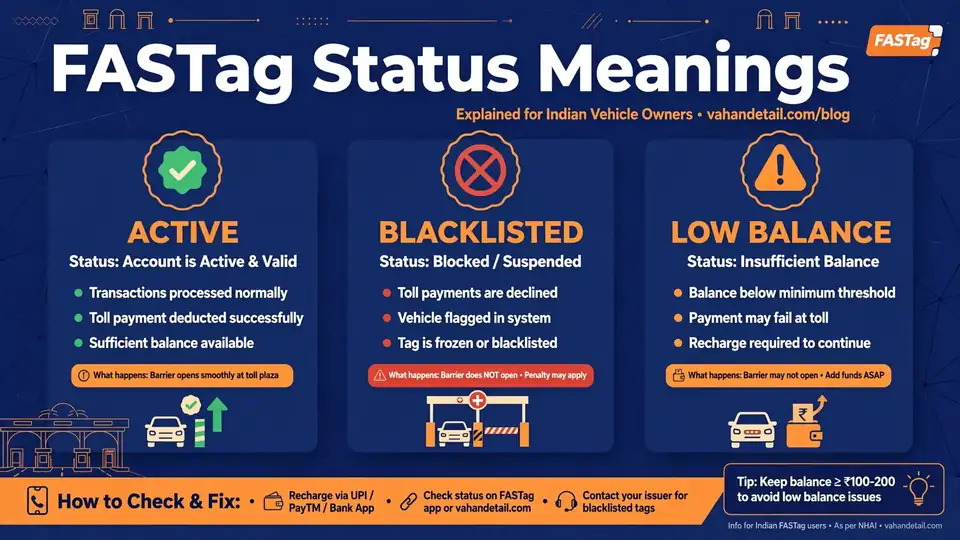
| Active | The tag works normally; toll is deducted from your wallet | Nothing needed, keep the balance topped up |
| Blacklisted | The tag is blocked and will not work at toll plazas | Recharge and clear the reason for blocking |
| Low Balance | The wallet holds less than your issuer's minimum threshold | Recharge before your next trip |
| Suspended | The tag is temporarily paused, often for KYC issues | Complete the pending KYC or contact your issuer |
| Closed | The tag is permanently deactivated | Apply for a new tag for the vehicle |
Low Balance and Blacklisted often arrive together: when the balance falls below the minimum threshold, many issuers automatically blacklist the tag.
Why Is My FASTag Blacklisted?
- Insufficient or negative balance. The most common cause: if your wallet is too low to cover a toll, or has gone negative after a chargeback, the tag stays blacklisted until you recharge.
- Incomplete KYC. Under NHAI's One Vehicle, One FASTag rule (April 2024), every tag needs complete KYC linked to one vehicle. Incomplete KYC remains a reason for suspension or blacklisting.
- Vehicle number mismatch. If the number on the tag does not match the vehicle it is fixed on, the tag can be blocked, a common issue with second-hand cars where the FASTag was never transferred.
- Disputed transactions or duplicate tags. Repeated payment failures or fraud flags can trigger a temporary block, and duplicate tags for the same vehicle are blacklisted under the One Vehicle, One FASTag rule.
A blacklisted FASTag is different from a vehicle blacklisted by an RTO or traffic authority. For the latter, see our guide on how to check vehicle blacklisted status online.
How to Reactivate a Blocked FASTag
In almost all cases, a blacklisted tag can return to active status the same day.
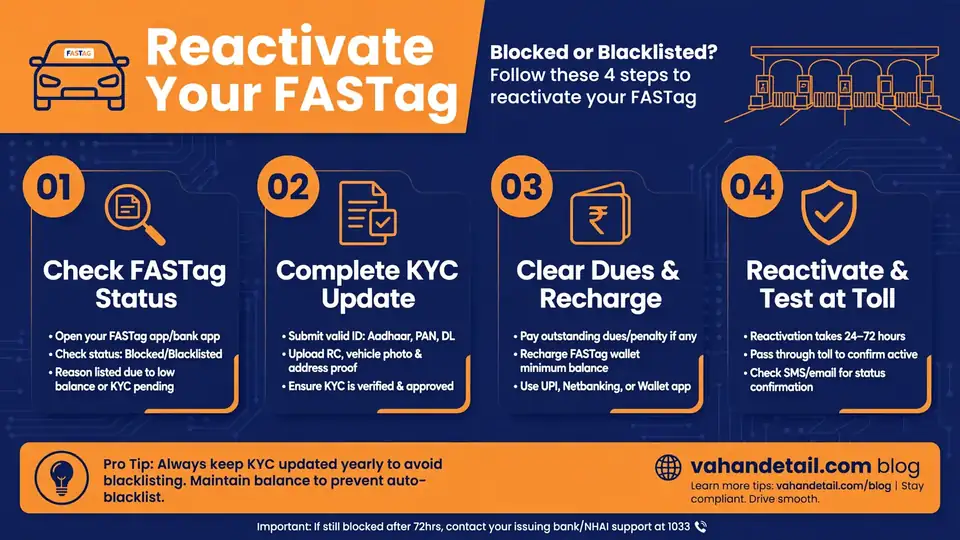
- Find out why it was blocked. Check the status reason on your issuer's portal or the MyFASTag app first. Do not recharge blindly if the reason is KYC or a data mismatch, because the block will come back.
- Recharge the wallet. If the reason is balance-related, recharge through the issuer app, UPI, net banking or the MyFASTag app, and keep the balance comfortably above the issuer's minimum threshold so the next toll deduction does not push you back into blacklisted status.
- Complete pending KYC. Upload the required documents through the issuer's portal or app; verification can take a few hours to a couple of days.
- Confirm the status flipped back. Most issuers reactivate a balance-blocked tag within minutes to a few hours of the recharge reflecting in the wallet.
If the tag shows Closed rather than Blacklisted, reactivation is not possible. Get a new tag, and close any old tags for that vehicle first, per the One Vehicle, One FASTag rule.
What Happens at the Toll Plaza With an Inactive Tag
Under the National Highways Fee Rules, a vehicle entering a FASTag lane without a valid, active FASTag is charged double the toll fee. Since February 16, 2021, cash payments also attract this double charge, so you cannot dodge the penalty by paying cash.
In practice, when your tag is blacklisted, suspended or short on balance, the reader cannot deduct the toll, you pay twice the normal fee, and you lose time in the manual queue. Keep a backup payment option (UPI or a card) in case a reader fails. If you suspect the tag was issued against wrong vehicle details (a common cause of blacklisting), cross-check the registration number and chassis number on the VAHAN portal and get the mismatch corrected with your issuer. Frequent highway drivers should also look at the FASTag Annual Pass, which covers up to 200 toll crossings for a fixed yearly price.
How can I check my FASTag status with just my vehicle number?
Log in to your issuer’s FASTag portal or the MyFASTag app with your registered mobile number and OTP, then look up your tags by vehicle number. You cannot check anonymously with only a vehicle number, because tag accounts are tied to the registered mobile for security.
Can a blacklisted FASTag be reactivated?
Yes, in most cases. Recharging usually reactivates a balance-blocked tag within minutes to a few hours. If the reason is incomplete KYC or a vehicle number mismatch, fix that first, then confirm the status has flipped back to Active.
What is the minimum balance I need to keep in my FASTag wallet?
Each issuer sets its own minimum threshold, and the tag is typically blacklisted below it. Keep the balance comfortably above the threshold so one toll deduction does not push you into blacklisted status mid-journey.
Does one vehicle need only one FASTag?
Yes. Under NHAI’s One Vehicle, One FASTag rule, effective from April 2024, each vehicle should have exactly one active FASTag with complete KYC. Duplicate tags for the same vehicle are blacklisted.
What happens if my FASTag has low balance at the toll plaza?
The reader fails to deduct the toll, and under the National Highways Fee Rules you are charged double the toll fee. Cash also attracts the double charge since February 16, 2021, so topping up before the trip is always cheaper.
My tag shows Active but the plaza reader did not detect it. What should I do?
Check the tag is fixed on the inside of the windscreen at the recommended spot, with no metallic sun film between tag and glass. If placement and balance are fine, the tag may be damaged or the reader faulty. Keep a backup payment method ready, and ask your issuer for a replacement if it repeats.
Key Takeaways
- Do a FASTag status check online before every long trip through your issuer's portal, the MyFASTag app, or the NETC FASTag pages, using your registered mobile number.
- Know the five statuses: Active, Blacklisted, Low Balance, Suspended and Closed. Low balance is the most common trigger for blacklisting.
- Most blacklisted tags reactivate the same day once you recharge above the issuer's minimum balance threshold and complete any pending KYC.
- A non-working tag at the plaza means double the toll fee under the National Highways Fee Rules, so a two-minute status check is the cheapest insurance on any highway journey.